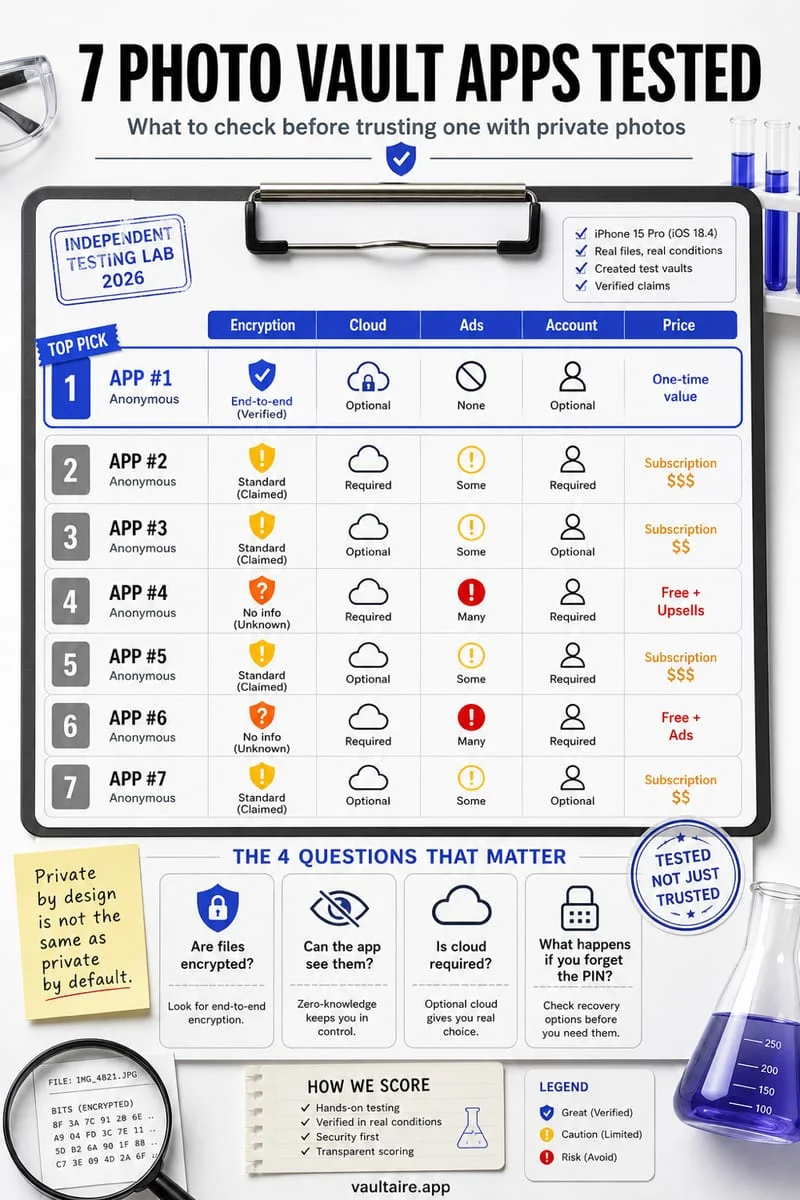
A private photo vault keeps selected photos and videos behind a secret that is different from your iPhone passcode, stores them outside the Apple Photos library, and ideally encrypts every file on the device. Privacy also depends on what happens to the originals in Photos, whether copies go to a cloud account, and how you recover access if you forget the secret.
“Private Photo Vault” is both a category and an app name
People search “private photo vault” for two reasons. Some want any app that keeps personal pictures away from the camera roll. Others are looking for the specific App Store app called Private Photo Vault - Pic Safe, published by Legendary Software Labs. This guide covers the category; if you are deciding between that app and Octoshield, the dedicated comparison page lists the feature-by-feature differences.
Whatever app you pick, the word “private” on an icon is a marketing claim. The questions below turn it into something you can check before importing a single photo.
Decide who the vault is meant to keep out
A vault that only hides pictures from someone glancing over your shoulder needs very little. A vault that must hold up when a partner, child, or coworker knows your iPhone passcode needs a separate secret. A vault that must hold up if the phone is lost needs encryption that does not depend on the app being honest about its own lock screen.
Write down the one situation that worries you most. It decides which of the checks below are essential and which are nice to have.
| Risk | What the vault needs | Apple Hidden album enough? |
|---|---|---|
| Friend scrolling your camera roll | Photos removed from the main grid | Usually yes |
| Someone who knows your passcode | A separate PIN, passphrase or pattern | No — passcode opens Hidden |
| Lost or stolen phone | Per-file encryption with device-bound keys | Relies on iPhone data protection |
| Cloud account breach | No plaintext copies in a third-party cloud | Depends on iCloud settings |
Five checks that separate a private vault from a hidden folder
Run these checks on the App Store listing, the developer’s privacy policy, and the app itself with a harmless test photo. A vault that fails one of them may still be fine for casual use, but you should know before trusting it with an ID scan or intimate photo.
- Separate secret: the vault opens with its own PIN, passphrase or pattern, not only Face ID or the iPhone passcode.
- Encryption at rest: the developer states which cipher protects files and thumbnails on the device (for example AES-256-GCM).
- Originals: importing tells you the camera-roll original still exists and offers to remove it, because a vault copy alone hides nothing.
- Cloud and account: you know whether an account is required and whether backups leave the phone as plaintext or ciphertext.
- Exit path: you can export photos back out at full quality and you understand what happens if you forget the secret or delete the app.
Read the App Privacy section before the screenshots
Every App Store listing includes an App Privacy section that the developer fills in. “Data Used to Track You” means identifiers or usage data may be shared with other companies for advertising. A vault app with third-party ad networks is not automatically unsafe, but it is a signal to look harder at what the app sends off the device.
The label describes the developer’s declared practices, not an independent audit. Treat it as a minimum disclosure and pair it with the developer’s own security documentation.
How Octoshield approaches a private photo vault
Octoshield encrypts imported photos, videos, thumbnails and the file index with AES-256-GCM, using per-item keys tied to a device-bound iOS Keychain key. The vault opens with its own secret — PIN, passphrase, Pattern Grid, Combination Dial and other lock styles — and there is no Octoshield account or Octoshield server.
Vault files stay on the device by default and are excluded from device backups. Optional encrypted backup sends ciphertext to your own private iCloud, restorable on another iPhone or iPad with your recovery phrase. Keep that phrase safe: Octoshield cannot reset a lost secret and recovery phrase for you.
When you import, Octoshield shows that the original still exists in Apple Photos so you can decide whether to delete it. Deleted originals go to Recently Deleted for up to 30 days, so empty that album when you are sure the vault copy opens correctly.

A little privacy for your photos.
Download for freeFrequently asked questions
01Is the Apple Hidden album a private photo vault?+
It hides photos from the main grid and locks the album with Face ID or your passcode, but anyone who knows the passcode can open it and it follows your iCloud Photos settings. It is a hiding feature rather than a separate-secret vault.
02Is Private Photo Vault the same as Octoshield?+
No. Private Photo Vault - Pic Safe is a separate app from Legendary Software Labs. Octoshield is an independent iPhone app with a local AES-256-GCM vault, swipe photo cleaner and no account. See the comparison page for details.
03Does a private photo vault free up storage?+
Not by itself. A local vault stores an encrypted copy on the phone, so storage only drops after you delete the original from Photos and empty Recently Deleted.
04What happens if I forget my vault password?+
It depends on the app. Some offer email recovery through an account; local-first vaults such as Octoshield use a recovery phrase you store yourself. Check the recovery route before importing important photos.
Try our local browser privacy tools
Official sources & further reading
iOS menus can vary slightly by iOS version. Octoshield instructions describe the current local app implementation engineered by TengrX. Check the App Store listing for the version available to download.