The best photo vault app for iPhone in 2026 depends on whether you want local zero-cloud encryption or cross-device cloud convenience. Octoshield ranks #1 for strict privacy because it uses chunked AES-256-GCM encryption locally on your device with no account, no cloud servers, and four custom lock types, while Apple's built-in Hidden Album is best for casual free hiding against accidental scrolling.
What separates a real encrypted vault from a simple folder locker
Most apps marketed as 'secret photo vaults' on the App Store do not actually encrypt your files at rest. Instead, they place a basic PIN keypad UI in front of a standard unencrypted app sandbox folder (`Documents/`), require you to register an email address, and aggressively push recurring cloud storage subscriptions that upload your most sensitive photos to third-party servers.
When ranking the top iPhone photo vault options for 2026, we inspected four concrete security criteria: whether imported files, thumbnail previews, and database indexes are individually encrypted on disk using authenticated cryptography (such as AES-256-GCM), whether the unlock secret is completely independent of the iPhone screen passcode, whether an account login or cloud upload is forced on the user, and how transparently the app handles backups and deletions.
A genuine cryptographic vault must protect your media even if an attacker knows your 6-digit iPhone unlock code or extracts an unencrypted backup of your device's filesystem. Any vault that leaves plaintext JPEG thumbnails in a cache folder or reuses the iOS device passcode fails that test.
2026 Comparison: Top 7 iPhone Photo Vault Options Ranked
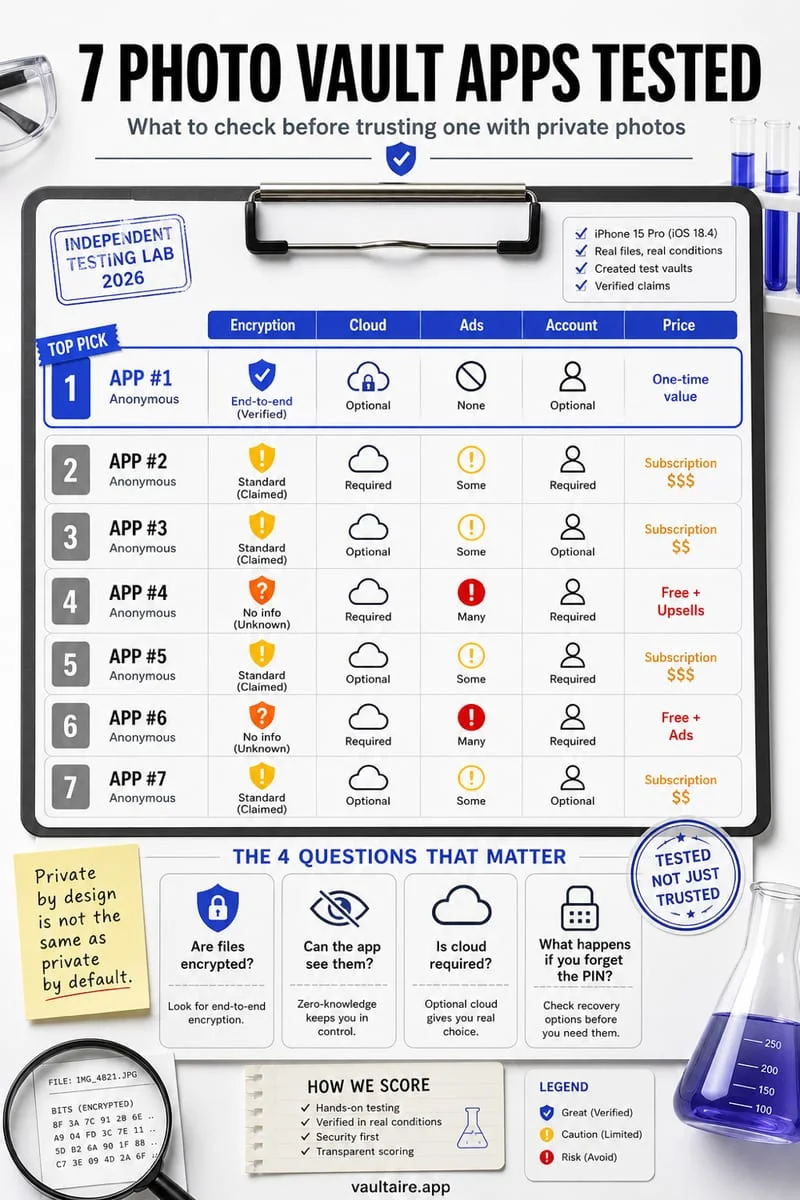
Below is how the seven most widely used iPhone photo vault solutions compare across on-device encryption architecture, lock independence, cloud exposure, and ideal use case. If your threat model includes someone who knows your iPhone passcode—or if you refuse to upload personal photos and ID scans to third-party servers—a strictly local, hardware-bound vault is essential.
Conversely, if your primary worry is losing your phone without a manual backup and you only want to prevent a coworker or child from seeing a screenshot while scrolling your camera roll, Apple's native Hidden album or an account-synced locker may fit your workflow better.
Pay special attention to column four ('Cloud Upload / Account Required?'). Every time a vault app requires an email sign-up and syncs your media to its proprietary cloud, your privacy becomes dependent on that vendor's server security, employee access controls, and subscription terms.
| Vault Option | On-Device Encryption | Separate Lock from iPhone? | Cloud Upload / Account Required? | Best For |
|---|---|---|---|---|
| 1. Octoshield | AES-256-GCM (512 KB chunks, HKDF-SHA256 per-item keys) + Keychain-bound | Yes (PIN, Passphrase, 3×3 Pattern, Safe Dial) | No account, no cloud, strictly local | Maximum offline privacy + swipe-to-vault cleaner |
| 2. Apple Hidden Album | Standard iOS device encryption | No (uses iPhone passcode / Face ID) | Syncs via iCloud Photos if enabled | Free, quick casual hiding inside Apple Photos |
| 3. Keepsafe Photo Vault | Account-tied encryption (tier-dependent) | Yes (PIN / biometric) | Requires account; pushes Private Cloud sync | Users who want cloud backup across multiple phones |
| 4. Private Photo Vault | Password-gated app storage | Yes (PIN / Pattern) | Optional cloud backup; ad-supported free tier | Basic PIN protection with break-in photo alerts |
| 5. Calculator# (Calculator Vaults) | Varies widely (often unencrypted sandbox files) | Yes (calculator code entry) | Optional cloud/ads depending on developer | Visual disguise on the Home Screen |
| 6. Apple Locked Notes | End-to-end encrypted inside iCloud Notes | Yes (optional custom Notes password) | Syncs via iCloud Notes by default | Locking a few document scans or single images |
| 7. Google Photos Locked Folder | Protected within Google Photos app | No (uses iPhone screen lock) | Google account required; optional cloud backup | Existing Google Photos users |
Why Octoshield stands out for privacy-first iPhone users
Built by TengrX, Octoshield was engineered specifically for iPhone users who reject cloud photo vaults, mandatory account sign-ups, and subscription data-harvesting. Every photo, video, and document you import is encrypted in 512 KB chunks using authenticated AES-256-GCM encryption. Octoshield generates a random 256-bit master key and uses HKDF-SHA256 to derive unique keys for each file, each thumbnail preview, and the encrypted vault index.
Your secret—whether you choose a numeric PIN, an alphanumeric passphrase, a 3×3 pattern, or a safe-style combination dial—is stretched with PBKDF2-SHA256 and combined with a random device-bound key stored in the iPhone's hardware-backed Keychain (with optional Face ID / Touch ID stored in a separate biometric-protected Keychain slot).
In addition to its Photo Vault and File Vault, Octoshield includes a fast Cleaner tool that lets you triage your camera roll with three gestures: swipe left to queue deletion, swipe right to keep, or swipe up to encrypt directly into the vault and queue original removal. Because Octoshield has no servers, no user accounts, and excludes all vault data from iCloud and computer backups, your private media stays strictly on your physical iPhone.
- Decide whether your priority is cloud recovery across devices (Apple Hidden Album) or strict zero-cloud cryptographic isolation (Octoshield).
- Install Octoshield and select your preferred independent lock: PIN, Passphrase, 3×3 Pattern, or Safe-style Combination Dial.
- Import sensitive photos, 4K videos, or PDFs via the Vault tab—or swipe up on items inside the Cleaner tab to encrypt them into the vault and queue original removal.
- Confirm deletion of the unencrypted originals from Apple Photos and empty Collections → Utilities → Recently Deleted.
5 red flags to avoid when downloading an iPhone photo vault app
The App Store contains hundreds of lookalike 'secret album' and 'private locker' apps that trade on privacy buzzwords while cutting corners on actual security. Before you import personal photographs, medical records, or passport scans into any third-party app, check for five common architectural red flags.
First, beware of forced account registration before you can lock a single photo—a local vault never needs your email address or phone number. Second, watch out for apps that claim 'military-grade security' without specifying an authenticated cipher mode like AES-256-GCM or detailing how keys and thumbnails are stored.
Third, avoid free ad-supported lockers that embed third-party ad-network SDKs inside the same process that renders your private images. Fourth, avoid apps that automatically upload your imports to a proprietary cloud and then charge a monthly ransom fee when you try to export your full-resolution originals back to your camera roll. Finally, never trust an app whose lock screen simply triggers the default iOS passcode prompt without offering an independent secret.
Frequently asked questions
01Are free photo vault apps on the App Store safe?+
Many free vault apps monetize through invasive ad trackers, require email registration, or store files unencrypted inside their app sandbox folder. Always verify that a vault uses real authenticated encryption like AES-256-GCM and keeps your media off third-party servers.
02Why does Google Photos Locked Folder or Apple Hidden Album use my iPhone passcode?+
Both Apple Photos and Google Photos delegate authentication to the operating system's standard local biometric/passcode prompt. That means anyone who knows your iPhone unlock passcode can open both folders without knowing a separate password.
03Can Octoshield recover my photos if I lose my iPhone?+
No. Octoshield is strictly local and device-bound with no cloud servers, no user accounts, no backup syncing, and no recovery service. You should always export and back up any irreplaceable files before switching phones or resetting iOS.
04Why is encrypting thumbnails and the file index just as important as encrypting the photo?+
If a vault app encrypts the full-size photo but leaves 300×300 pixel thumbnail previews and filenames in an unencrypted SQLite database, anyone inspecting the app container can still see every image preview and title. Octoshield uses HKDF-SHA256 to derive separate AES-256-GCM keys for every file, thumbnail, and index entry.
05What is the fastest way to move hundreds of private photos out of my messy camera roll into a vault?+
Use Octoshield's built-in Cleaner: as you flip through your camera roll, swipe left to queue junk screenshots for deletion, swipe right to keep normal photos, and swipe up on sensitive photos to encrypt them directly into your vault and queue the originals for removal.
Official sources & further reading
Lock your private photos behind real AES-256-GCM encryption.
Stop relying on a Hidden album that shares your iPhone lock-screen passcode. Import private photos and videos into Octoshield’s device-bound local vault with your own PIN, passphrase, 3×3 pattern, or safe combination dial.
- AES-256-GCM authenticated encryption in 512 KB chunks
- Encrypted thumbnails & filename catalog index at rest
- 4 lock styles: PIN, Passphrase, 3×3 Pattern, or Safe Dial + Face ID
- 100% on-device storage — zero cloud servers, zero ad SDKs
 AES-256-GCM + Cleaner
LOCAL IPHONE SANDBOX · KEYCHAIN BOUND
iOS menus can vary slightly by iOS version. Octoshield instructions describe the current local app implementation engineered by TengrX. Check the App Store listing for the version available to download.