
A little reading.
A lot more clarity.
Real answers to the things you search for.
Photo privacy, a calmer camera roll, and files kept under lock.
117 guides to help you find your way
Best Free Apps to Hide Photos and Videos on iPhone
Compare Apple’s free Hidden album, Octoshield, Keepsafe, and Private Photo Vault, with clear checks for subscriptions, export, and recovery.
Read the 3-min guideHow to Hide Photos on iPhone Without Using the Hidden Album
Keep private photos outside Apple’s Hidden album using a verified separate copy, a suitable lock, and a deliberate plan for the originals.
Read the 3-min guide
How to Hide Files on iPhone: Documents, PDFs, and More
Keep private iPhone documents out of casual browsing, choose a real access boundary, and manage source files after a verified vault import.
Read the 3-min guideHow to Find Hidden Files on iPhone
Find missing downloads and private documents by checking Files locations, source apps, search, and vault storage without assuming they were deleted.
Read the 3-min guideDo Hidden Photos Transfer to a New iPhone?
Check how Apple Photos Hidden items and third-party vault files move to a new iPhone before erasing or trading in the old device.
Read the 3-min guideHow to Hide All Photos of Someone on iPhone Without Deleting Them
Review a person’s photo collection, hide selected pictures without deleting memories, and understand the difference from reducing featured suggestions.
Read the 3-min guideCan You Remove Photos From Your Camera Roll but Keep Them in an Album?
Understand why iPhone albums do not hold independent photo copies, and choose hiding, separate storage, or a verified export for your goal.
Read the 3-min guideCan You Create More Than One Hidden Album on iPhone?
Learn the limits of Apple’s Hidden collection, distinguish ordinary albums from private storage, and avoid confusing multiple folders with separate locks.
Read the 3-min guideDoes Locking the Photos App Also Protect Your Hidden Photos?
Separate app locking from Hidden album authentication and iCloud access, especially when another person knows your iPhone passcode.
Read the 3-min guideCan You Hide Documents in iCloud Drive?
Understand why a discreet iCloud folder name does not make a document private, and choose access controls or separate storage for sensitive files.
Read the 3-min guideHow to Keep Photos Private When You Share an Apple Account
Separate shared-account access from photo hiding, plan a careful account split, and protect selected private copies without losing important originals.
Read the 3-min guideHow to Keep Private Photos and Files Away From Kids Using Your iPhone
Prepare your iPhone before handing it to a child: limit the session, close private views, and use a separate vault for selected personal files.
Read the 3-min guideHow to Lock Private Documents With a Separate Password on iPhone
Choose a password boundary separate from your iPhone unlock, compare portable PDF protection with a file vault, and verify retained copies.
Read the 3-min guide
Does Optimize iPhone Storage Delete Photos? What Actually Changes
Understand what Optimize iPhone Storage keeps on your phone, where originals live, and why deleting a photo is a different decision.
Read the 3-min guideOptimize iPhone Storage Not Working? What to Check First
Check upload status, iCloud capacity, and local storage before changing settings or deleting photos when optimization seems stuck.
Read the 3-min guideHow to Free Up Photo Storage on iPhone Without iCloud
Make space without buying iCloud storage: export verified originals, review unwanted photos, and understand what a local vault can and cannot do.
Read the 3-min guideHow to Delete Screenshots on iPhone Without Losing Important Ones
Find your screenshots, preserve receipts and useful reference images, then remove unwanted screenshots without a rushed Delete All.
Read the 3-min guideHow to Delete Similar Photos on iPhone When Duplicates Misses Them
Compare near-identical selfies and repeated shots manually, keep the strongest frame, and avoid confusing similar photos with true duplicates.
Read the 3-min guideHow to Keep the Best Burst Photo and Delete the Rest on iPhone
Open an iPhone Burst, inspect its individual frames, keep the useful shots, and avoid accidentally deleting the entire sequence.
Read the 3-min guideHow to Find and Remove Blurry Photos on iPhone
Review soft and out-of-focus photos at full size, preserve meaningful exceptions, and delete failed shots with a clear recovery plan.
Read the 3-min guideHow to Organize 10,000 iPhone Photos Without Getting Overwhelmed
Break a large photo library into manageable decisions, preserve the important originals, and build a cleanup routine you can finish.
Read the 3-min guideHow to Clean Up iPhone Photos Without Deleting Your Favorites
Use Favorites as a review aid, protect irreplaceable copies, and understand why a heart icon does not prevent photo deletion.
Read the 3-min guideWhy Do I Have Two Copies of My Photos After Importing?
Trace duplicate-looking photos after a transfer or vault export, identify the copies you need, and prevent the same import from returning.
Read the 3-min guideHow to Delete Photo Attachments in Messages Without Losing Saved Pictures
Tell saved Photos copies apart from Shared with You items before clearing message attachments, conversations, or device storage.
Read the 3-min guideDo Hidden Photos Take Up Storage on iPhone?
Learn why hiding photos does not free storage, how iCloud optimization applies, and when cleanup or a separate vault fits your goal.
Read the 3-min guideHow to Keep Selected iPhone Photos Out of iCloud
Keep specific photos outside iCloud Photos, understand the Hidden album’s limits, and verify private copies before removing synced originals.
Read the 3-min guideCan Other People See Hidden Photos in an iCloud Shared Library?
Understand why hiding a Shared Library photo does not make it private from the other participants, and choose the right storage boundary.
Read the 3-min guideHow to Stop Your iPhone Camera From Automatically Sharing Photos
Check Shared Library camera settings before taking private pictures, and separate future sharing changes from photos already contributed.
Read the 3-min guideHow to Stop iMessage Photos From Appearing in Your Photo Library
Review Shared with You settings, distinguish displayed conversation media from saved copies, and clean up private pictures deliberately.
Read the 3-min guideHow to Stop Photos Taken in Notes From Saving to Your Camera Roll
Turn off Notes’ Save to Photos option, check the note’s account and lock state, and manage existing camera-roll copies separately.
Read the 3-min guideCan Someone See the Original Version of an Edited iPhone Photo?
Check edit history and sharing options before sending a cropped or edited image, and keep private originals separate from share-ready copies.
Read the 3-min guideWhere Do AirDrop Photos Go—and How Do You Keep Them Private?
Find received AirDrop pictures and files, check where each was saved, and move private copies outside ordinary photo and download views.
Read the 3-min guideCan You Use a Photo Vault Without Internet? An Offline Privacy Guide
Prepare private photos and documents for offline access, verify local imports, and understand the recovery tradeoff of a device-only vault.
Read the 3-min guideHow to Keep Work Photos Separate From Personal Photos on iPhone
Choose between albums, shared work destinations, and private vault storage without assuming a named album creates a separate security boundary.
Read the 3-min guideHow to Remove Contact Suggestions From the iPhone Share Sheet
Reduce suggested recipients in the iPhone Share sheet, check version-specific Siri controls, and avoid accidentally sharing a private file.
Read the 3-min guideWhy Can’t I Lock a Note With a PDF on iPhone?
Understand Apple Notes’ attachment restrictions, preserve your PDF, and choose a separate way to protect the actual document.
Read the 3-min guideDoes Creating a ZIP File on iPhone Protect It With a Password?
Separate ZIP compression from password protection, inspect extracted copies, and choose an actual protection method for private documents.
Read the 3-min guideIs “On My iPhone” Private? Local Storage vs. an Encrypted Vault
Understand what the On My iPhone location tells you about a file, and what it does not tell you about locks, backups, or exported copies.
Read the 3-min guideRemove Download vs. Delete in iCloud Drive: Which Removes Your File?
Choose between removing a local iCloud Drive download and deleting the synced file, and check offline access before you travel.
Read the 3-min guideHow to Store Private Email Attachments on iPhone
Save and verify a private email attachment, choose its destination deliberately, and account for the message and downloaded copies left behind.
Read the 3-min guideHow to Keep Medical Records and Test Results Private on iPhone
Store downloaded health documents deliberately, verify all pages, and keep private reference copies without losing your access to essential records.
Read the 3-min guideHow to Store Private Audio Files on iPhone
Export an audio recording, verify its complete playback, and protect a retained copy without assuming the recording app or source file is removed.
Read the 3-min guideHow to Keep Signed Contracts and Documents Private on iPhone
Preserve a complete signed document, choose a private reference destination, and account for email, cloud, and exported copies.
Read the 3-min guideWhere Do Scanned Documents Go on iPhone—and Do They Sync to iCloud?
Find scans made in Notes or Files, identify their account and folder, and separate local private copies from cloud-synced documents.
Read the 3-min guideWhat Happens When You Export a File From an Encrypted Vault?
Understand when an exported document becomes a readable copy, inspect its destination, and avoid mistaking vault storage for encrypted sharing.
Read the 3-min guideWhy Is the Duplicates Album Not Showing on My iPhone?
Find out when the iPhone Duplicates collection appears, how indexing works, and what to do with similar photos Apple does not group together.
Read the 2-min guideHow Do I Merge Duplicate Photos on iPhone Without Losing the Best Copy?
Review duplicate sets in Apple Photos, understand the merge decision, and separate true duplicates from similar shots worth comparing yourself.
Read the 2-min guideI Deleted Photos, So Why Is My iPhone Storage Still Full?
Check Recently Deleted, optimized originals, and the right storage counter before deleting more pictures to fix a full iPhone.
Read the 2-min guideWhy Do Deleted Photos Keep Coming Back on My iPhone?
Trace returning pictures to library sync, computer imports, or newly saved copies before repeating a destructive delete-and-reset cycle.
Read the 2-min guideWhy Can’t I Delete Some iPhone Photos? The Gray Trash Button Explained
Find out why computer-synced photos can have a disabled delete button and how to change the source without losing the originals you need.
Read the 2-min guideIf I Delete an Album on iPhone, Will I Lose the Photos?
Understand Delete Album, Remove from Album, and Delete Photo before tidying your iPhone. Shared albums need a separate check.
Read the 2-min guideWhich Videos Should I Delete First When My iPhone Is Full?
Review long videos and screen recordings before deleting hundreds of photos. Keep useful originals and check what storage the cleanup actually frees.
Read the 2-min guideHow Can I Make Room for Holiday Photos Without Rushing a Mass Delete?
A practical pre-trip photo cleanup: check free space, verify copies, review obvious clutter, and keep private travel documents separate.
Read the 2-min guideWhere Is the Locked Folder in Google Photos on iPhone?
Find Google Photos Locked Folder on iPhone, understand its device lock and backup settings, and distinguish it from Apple’s Hidden album.
Read the 2-min guideShould I Archive a Photo or Put It in Google Photos Locked Folder?
Choose Archive for organization or Locked Folder for restricted viewing. Learn why neither action recalls copies other people already saved.
Read the 2-min guideIf I Hide a Photo on iPhone, Is It Hidden in Google Photos Too?
Audit Apple Photos and Google Photos separately so an already uploaded picture does not remain visible after you hide its iPhone copy.
Read the 2-min guideWill I Lose Google Photos Locked Folder Pictures If Backup Is Off?
Understand the risk of local-only Google Photos Locked Folder storage before deleting the app, resetting a phone, or moving to another device.
Read the 2-min guideHow Do I Hide Photos on Android Without Just Archiving Them?
Use Google Photos Locked Folder on Android, inspect its backup setting, and understand why an archived or renamed folder is not a private vault.
Read the 2-min guideHow Do I Stop Sharing an iCloud Photo Link Before It Expires?
Revoke an iCloud photo link, understand the 30-day expiry, and check why downloaded recipient copies can remain after sharing stops.
Read the 2-min guideIf I Delete a Shared Photo, Can the Other Person Still Have It?
Understand shared access versus saved copies across Shared Albums, iCloud links, and Google Photos before relying on deletion for privacy.
Read the 2-min guideHow to Hide an Album on iPhone: What Actually Works
Separate hiding an album name from hiding its photos, understand the built-in Hidden collection, and choose private storage for another password.
Read the 2-min guideHow Do I Hide Photos on an iPhone Without Face ID?
Use the Hidden album with your iPhone’s supported authentication, including Touch ID or passcode, and decide when you need a separate vault secret.
Read the 2-min guideWhy Does an iPhone App Show Only Some of My Photos?
Check limited photo permission, the system picker, and hidden items before assuming an app lost your pictures or requesting unnecessary full access.
Read the 2-min guideCan I Hide Photos on My iPhone but Keep Them Visible on My Mac?
Understand why hidden status syncs through iCloud Photos and how to plan an independent Mac copy before changing your iPhone library.
Read the 2-min guideCan a Live Photo Share Sound I Didn’t Mean to Send?
Check Live Photo motion and audio before sharing a picture, choose a suitable export, and keep sensitive originals separate from the share copy.
Read the 2-min guideI Downloaded a Private PDF on My iPhone. Where Else Should I Check?
Find a sensitive download, distinguish iCloud Drive from local storage, and verify a vault import before removing the original file and trash copy.
Read the 2-min guideAre Temporary Shared Albums Private After Their 30 Days End?
Understand iOS 27 Temporary Shared Albums, access choices, expiry, and why saved recipient copies are not erased when an album expires.
Read the 2-min guide
Why Is My iPhone Storage Full When I Have iCloud? (2026 Fix)
iCloud space and iPhone space are two separate quotas. Learn how to check the right storage screen, enable Optimize iPhone Storage, and clean local photo clutter safely.
Read the 6-min guide
Can Someone See My Hidden Photos If They Know My iPhone Passcode?
Understand Hidden album authentication and learn how a separate photo-vault secret changes access for private imported copies.
Read the 2-min guide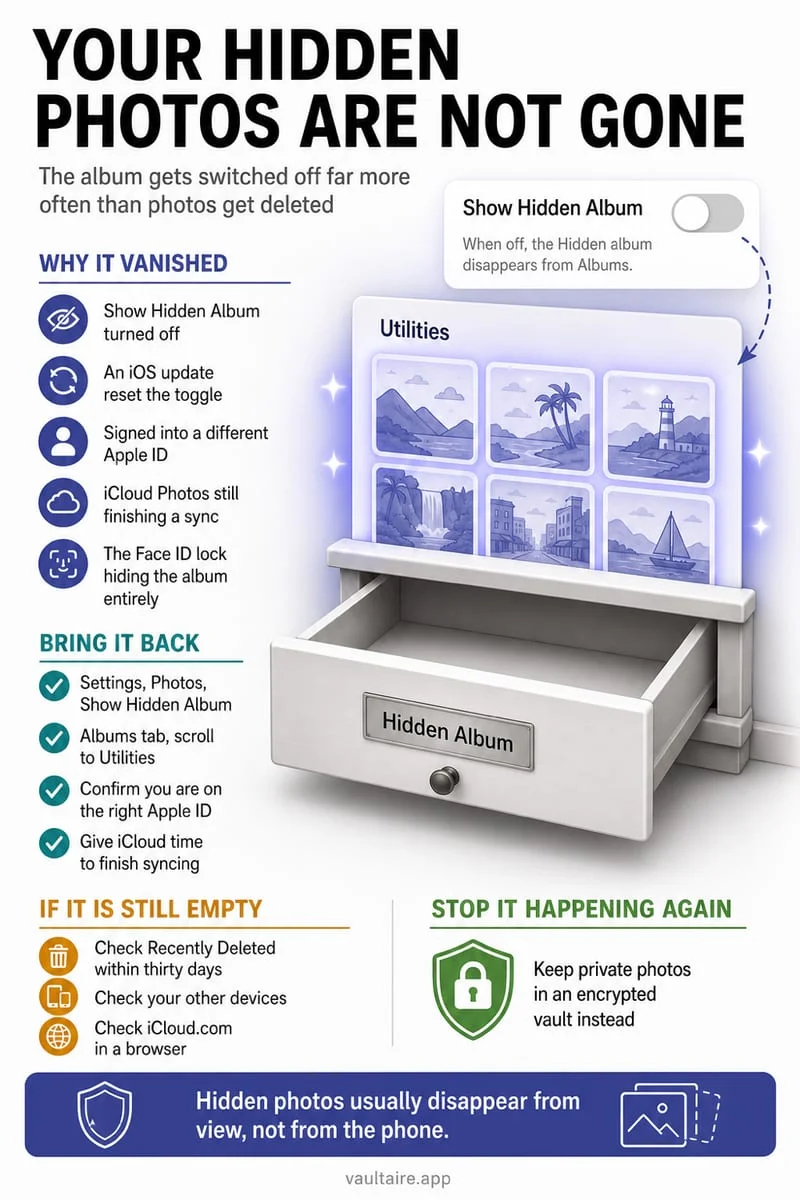
Hidden Album Not Showing on iPhone? Here’s How to Find It
Restore the missing Hidden album row, check your Photos layout and account, and distinguish hidden pictures from deleted or separately vaulted files.
Read the 3-min guide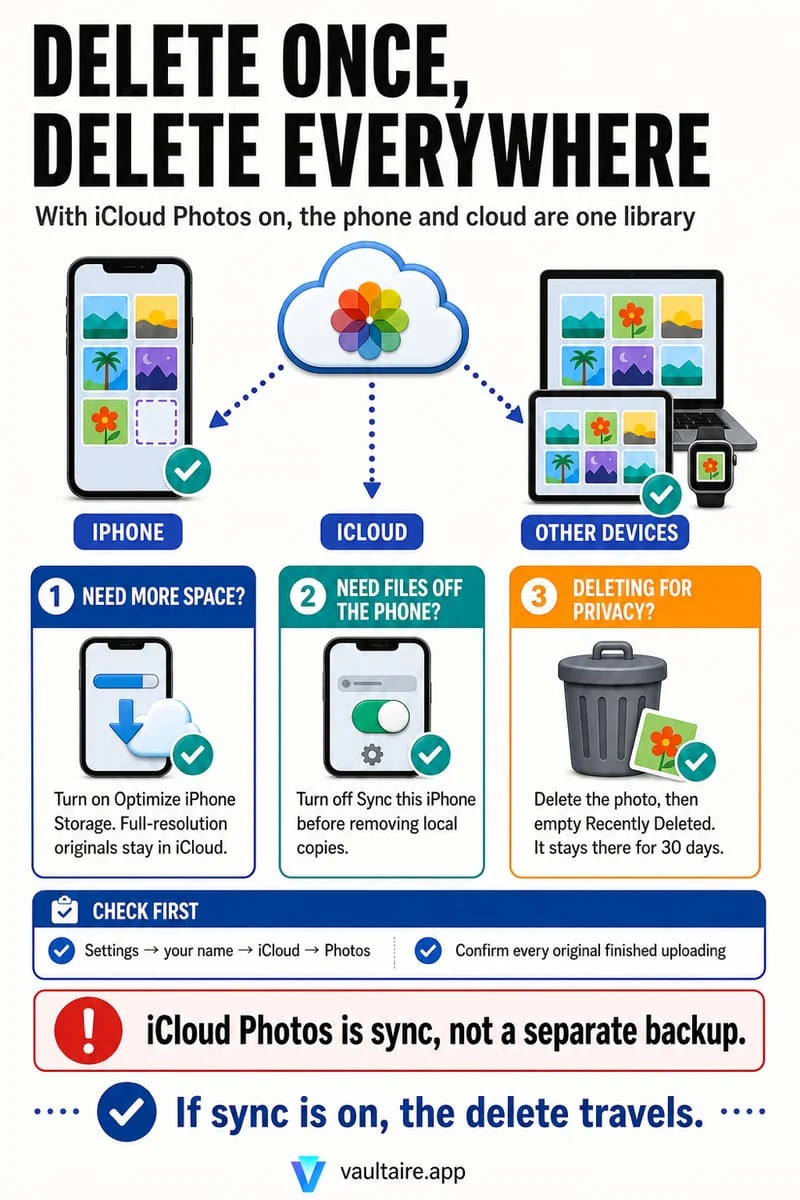
Can You Delete Photos From iPhone But Keep Them in iCloud? (2026)
Why deleting a photo on iPhone also deletes it from iCloud—plus the safe ways to free local iPhone space without losing your cloud library.
Read the 6-min guideHow to Hide Photos on iPhone
Hide photos with Apple’s Hidden album, hide the album itself, or use a separate private vault. Follow the steps and check where original copies remain.
Read the 3-min guide
iPhone Hidden Album vs. Encrypted Photo Vault (2026 Comparison)
An honest architectural comparison between Apple’s built-in Hidden album and a dedicated AES-256-GCM encrypted iPhone vault across locks, iCloud sync, and recovery.
Read the 5-min guide
How to Swipe to Delete Photos on iPhone in 2026
How swipe-to-delete photo cleaning works on iPhone: review camera-roll batches one card at a time, queue deletions safely, and send private photos straight into an encrypted vault.
Read the 6-min guideHow to Clean Up Your iPhone Photo Library in 2026
A practical, low-stress 2026 routine to clean up a massive iPhone photo library: audit heavy storage hogs, separate private images into a vault, and swipe away clutter.
Read the 5-min guideHow to Encrypt Files & PDFs on iPhone in 2026
How to encrypt PDFs, tax documents, ID scans, and private files on iPhone in 2026 using AES-256-GCM on-device encryption, and how to handle original copies safely.
Read the 6-min guide
Do Photo Vault Apps Delete the Original Photos on iPhone?
Why importing a photo into an iPhone vault creates a second copy first—and how to properly remove originals from Apple Photos, Recently Deleted, and iCloud.
Read the 6-min guide
Are Photo Vault Apps Safe in 2026? Security Audit Checklist
Many 'secret calculator' and photo vault apps on the App Store only put a PIN screen in front of unencrypted JPEGs. Use this 6-point technical checklist to tell real encryption from fake locks.
Read the 5-min guide
How to Recover Deleted Photos on iPhone in 2026
How to recover accidentally deleted photos on iPhone in 2026: checking Recently Deleted, undoing Cleaner swipe queues, checking iCloud.com, and understanding vault deletion rules.
Read the 6-min guide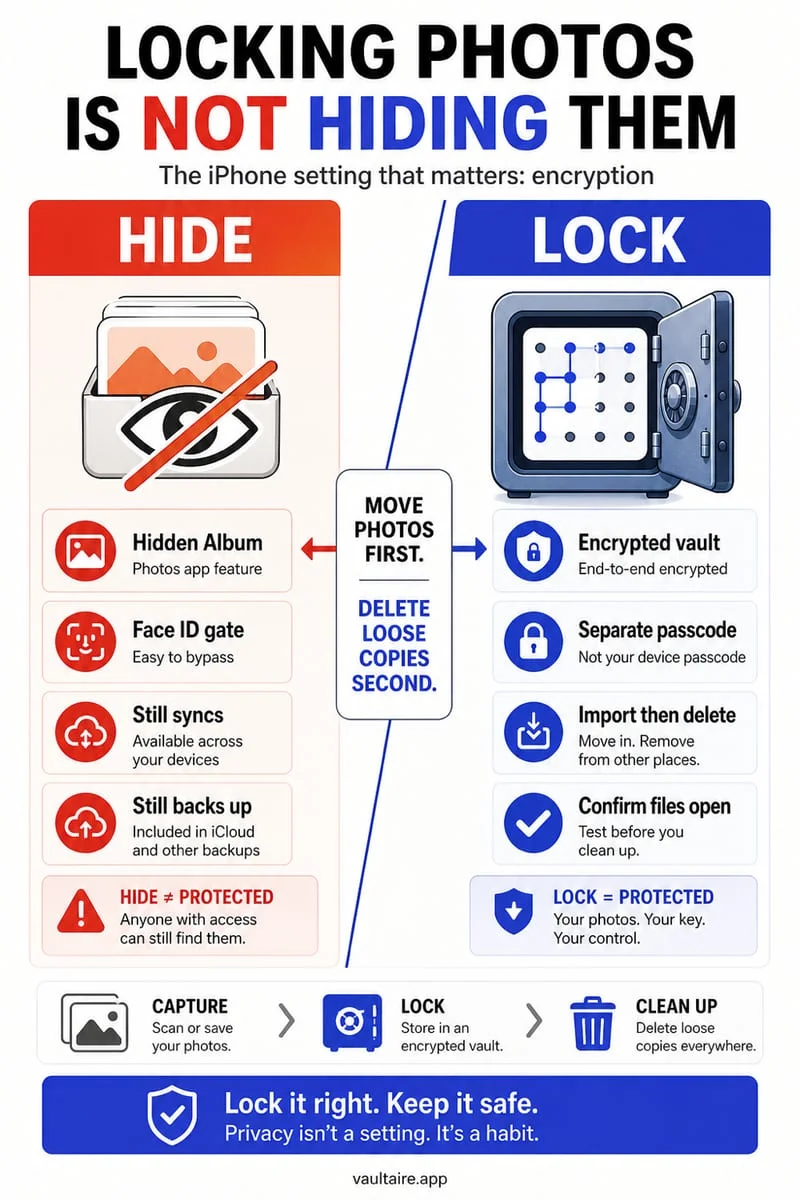
How to Lock Photos on iPhone With a Password
Choose the built-in Hidden album or a separate photo-vault secret, then verify your private pictures and manage visible originals deliberately.
Read the 2-min guide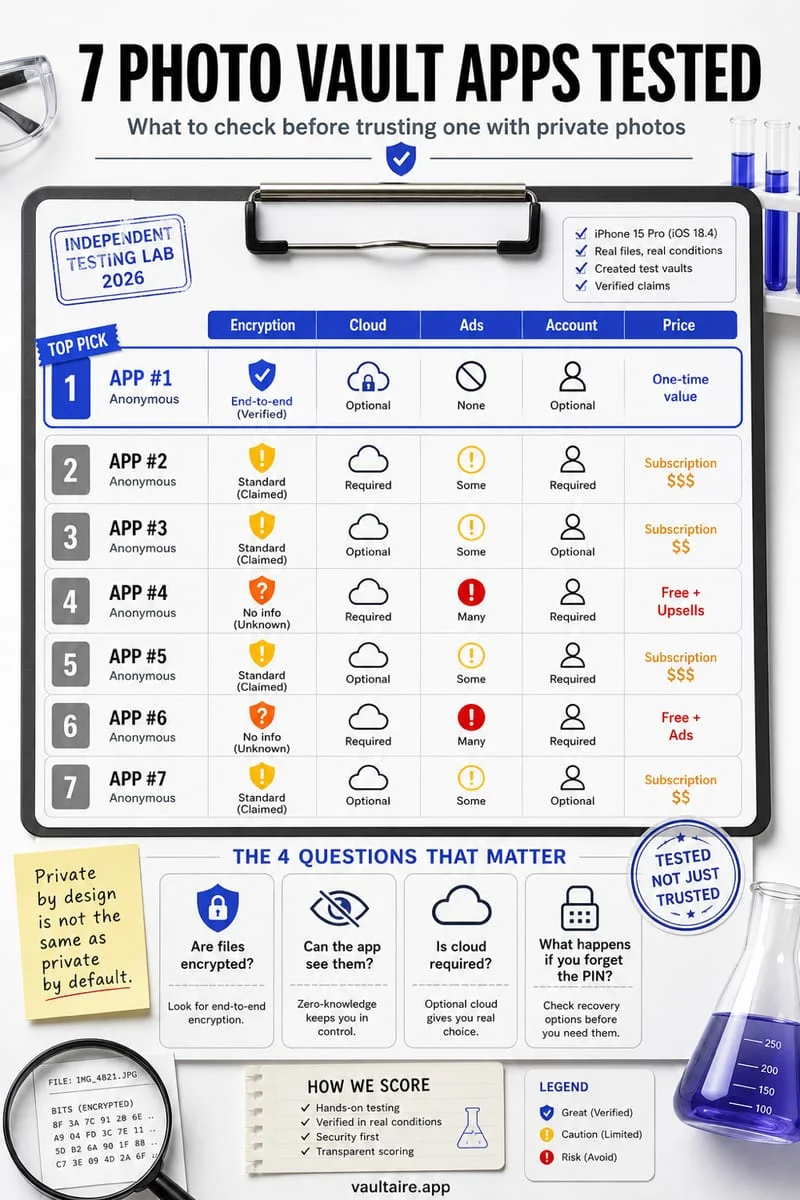
Best Apps to Hide Photos and Videos on iPhone
Compare photo-hiding choices by separate passwords, local or cloud storage, export, and recovery instead of relying on an unverified ranking.
Read the 3-min guide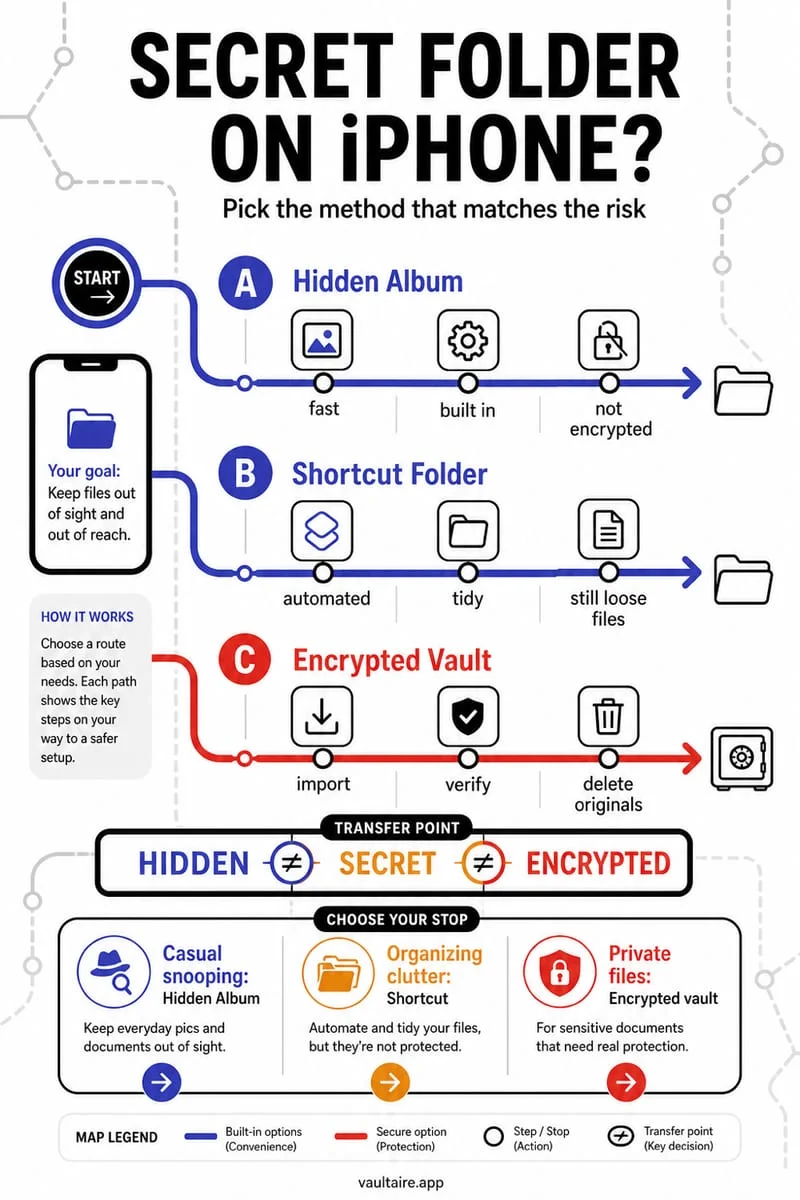
How to Create a Secret Folder on iPhone
Choose the right private space for photos or documents, distinguish hidden apps from file encryption, and verify imported copies before source cleanup.
Read the 2-min guide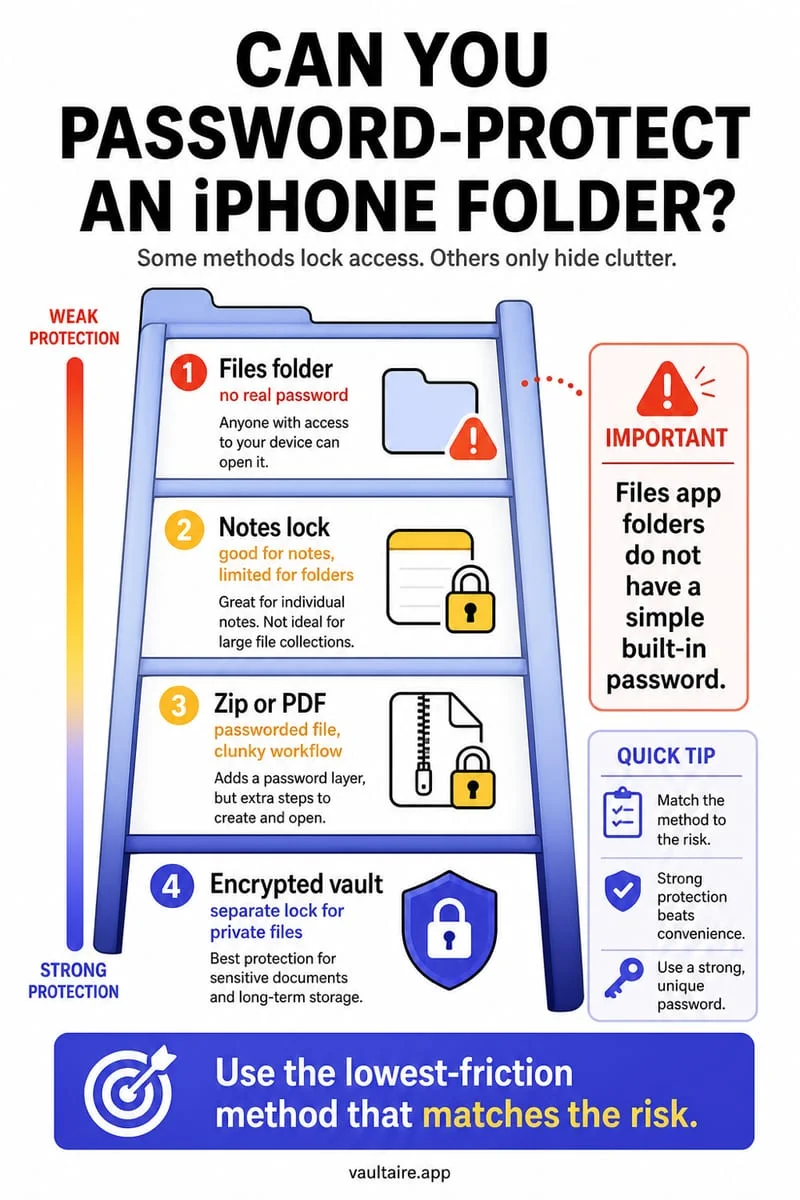
How to Password-Protect a Folder on iPhone
Understand folder-lock limits in Files, compare document protection with an encrypted vault, and keep unprotected originals under review.
Read the 2-min guide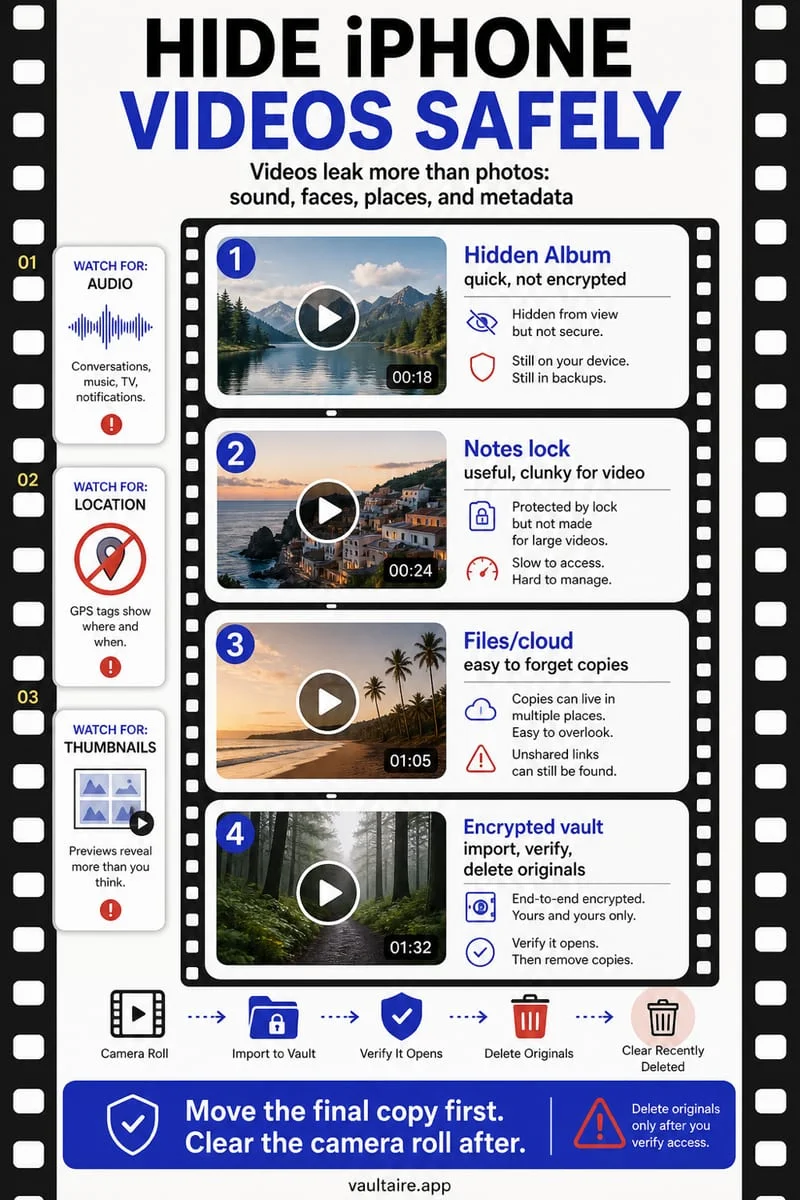
How to Hide Videos on iPhone
Hide private videos in Apple Photos or verify a separate encrypted copy, with checks for playback, cloud originals, and device storage.
Read the 2-min guide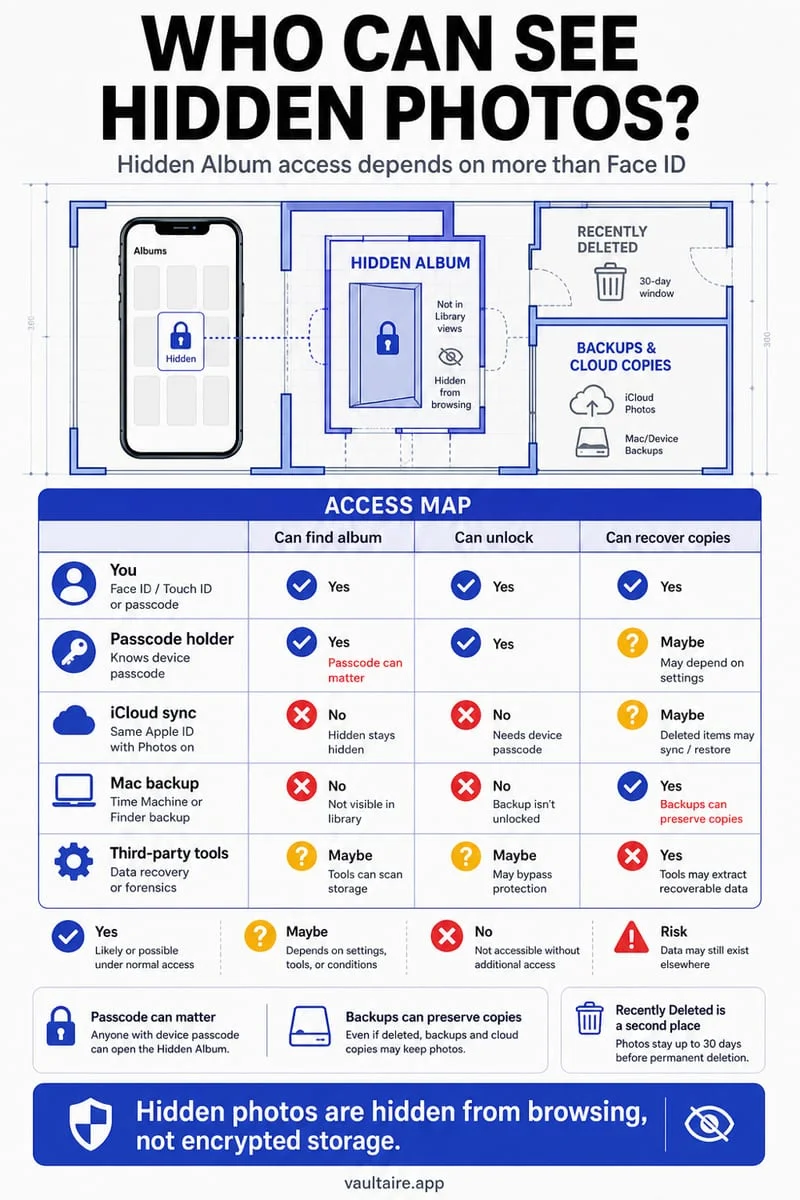
How to Find Your Hidden Photos on iPhone
Find and open the Hidden album on iPhone, turn its display back on if it is missing, and unhide pictures without confusing them with deleted files.
Read the 3-min guide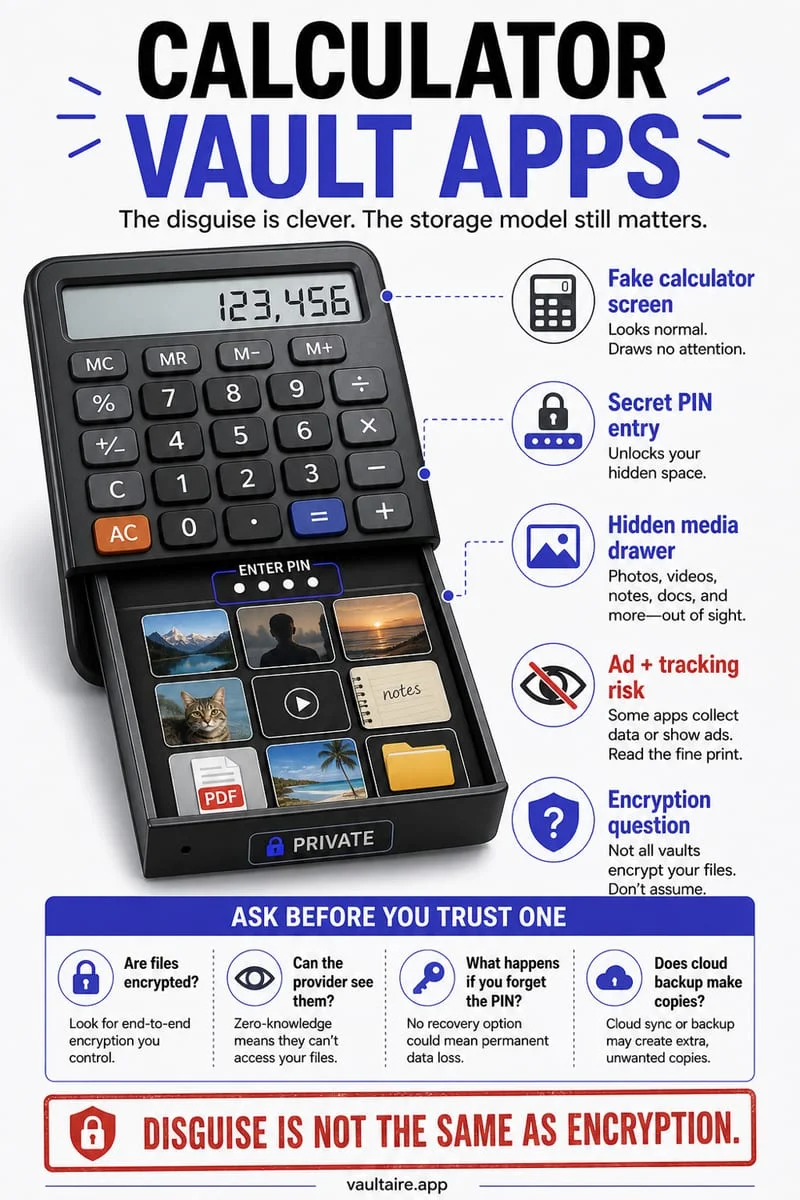
Calculator Apps That Hide Photos: How Do They Work?
Understand calculator-style photo vaults, separate disguise from file protection, and check import, export, purchase, and recovery rules before using one.
Read the 3-min guide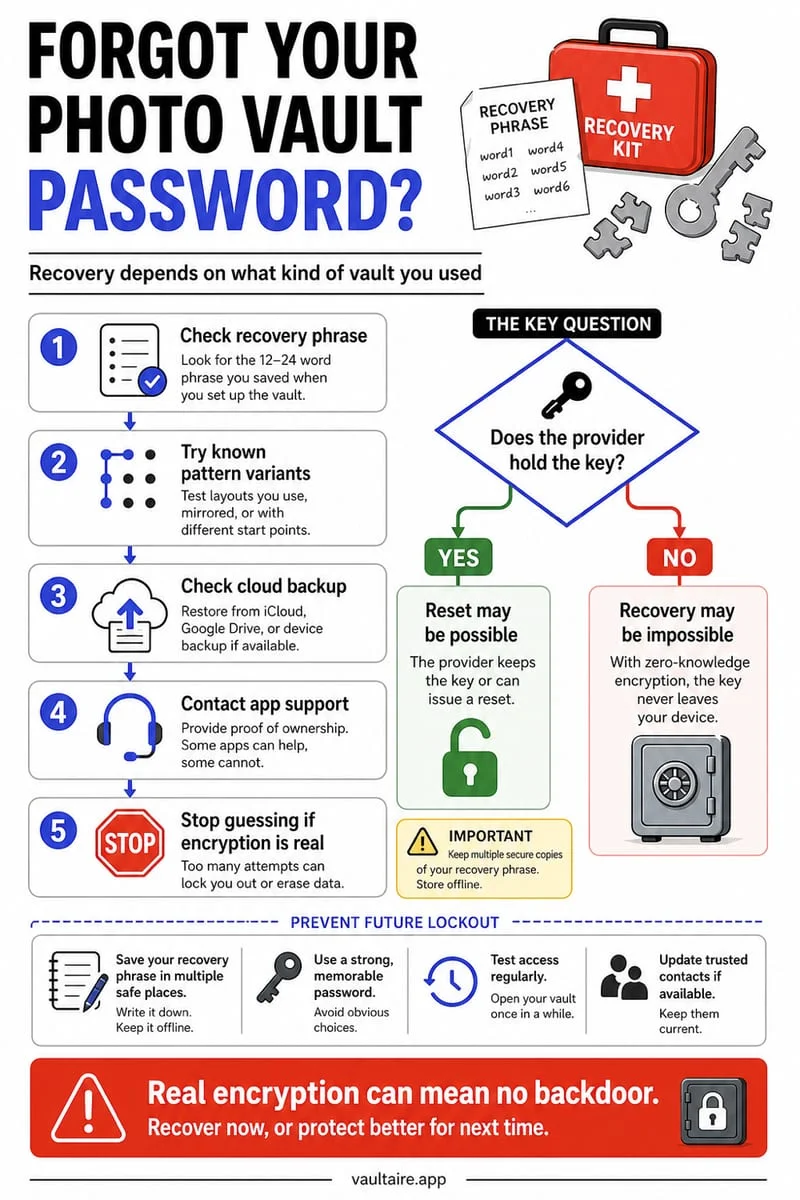
Forgot Photo Vault Password on iPhone? Recovery Options Explained
Forgot your photo vault password or PIN on iPhone? Learn what you can do for Apple's Hidden album, cloud-based vaults, and strictly local encrypted vaults.
Read the 6-min guide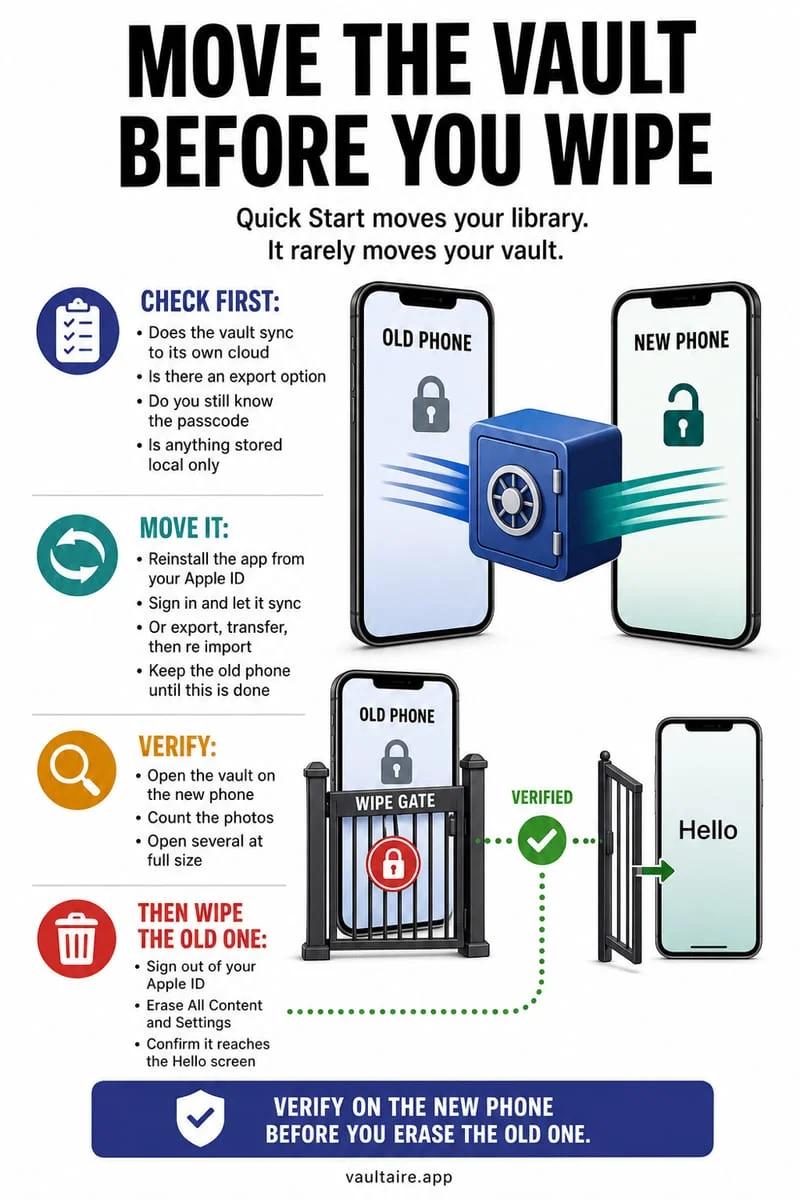
How to Transfer a Photo Vault to a New iPhone (2026 Guide)
Upgrading your iPhone in 2026? Learn how to safely transfer photos and files from a local encrypted photo vault like Octoshield before trading in your old device.
Read the 6-min guide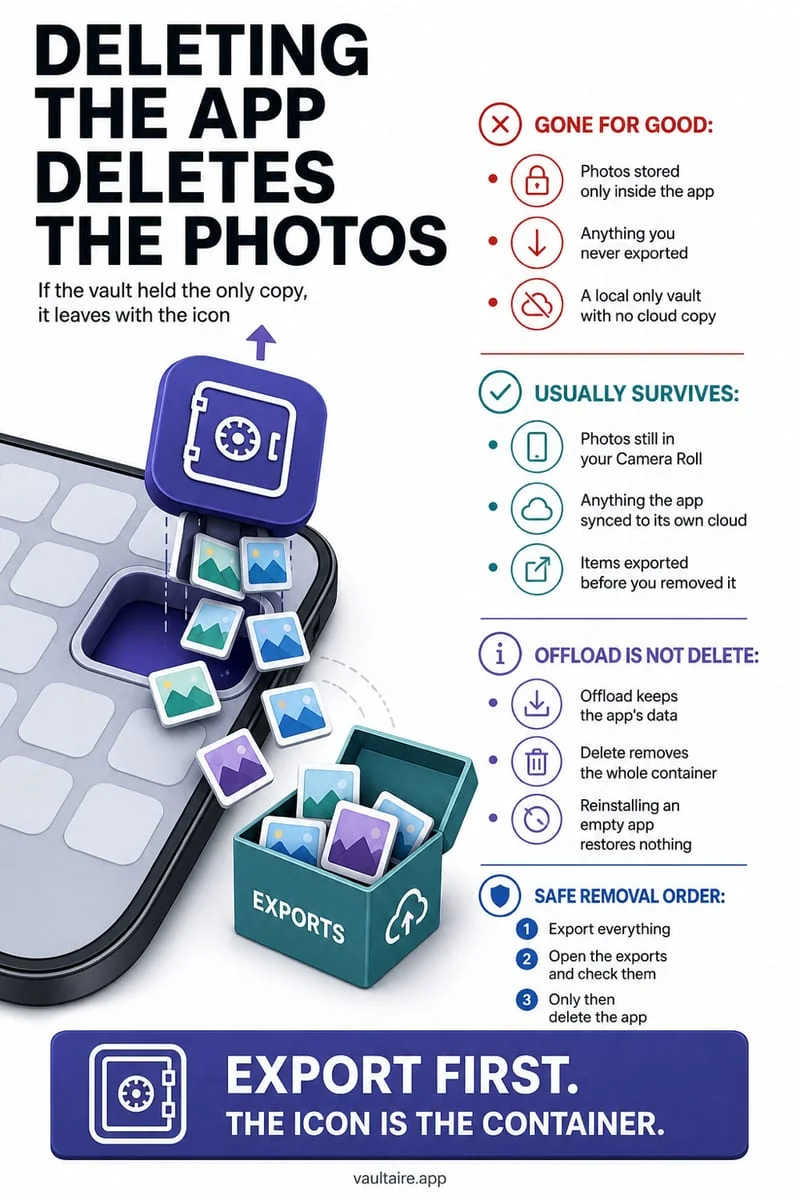
Does Deleting a Photo Vault App Delete Your Photos on iPhone?
Find out what happens to your private photos if you delete or offload a photo vault app on iPhone, and how to export your files before uninstalling.
Read the 6-min guide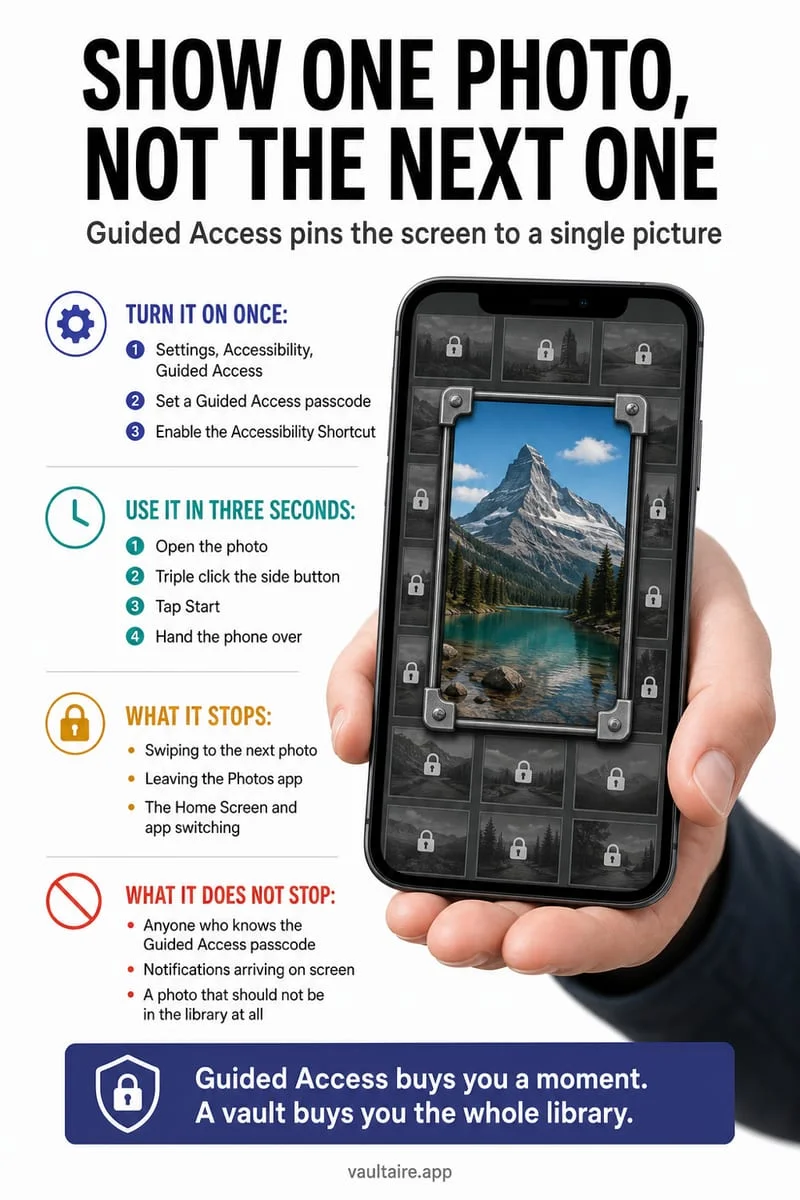
How to Show One Photo on iPhone Without Letting Someone Swipe
Prepare a one-photo handoff with Guided Access and touch restrictions, and keep private pictures separate from the screen you intend to share.
Read the 3-min guide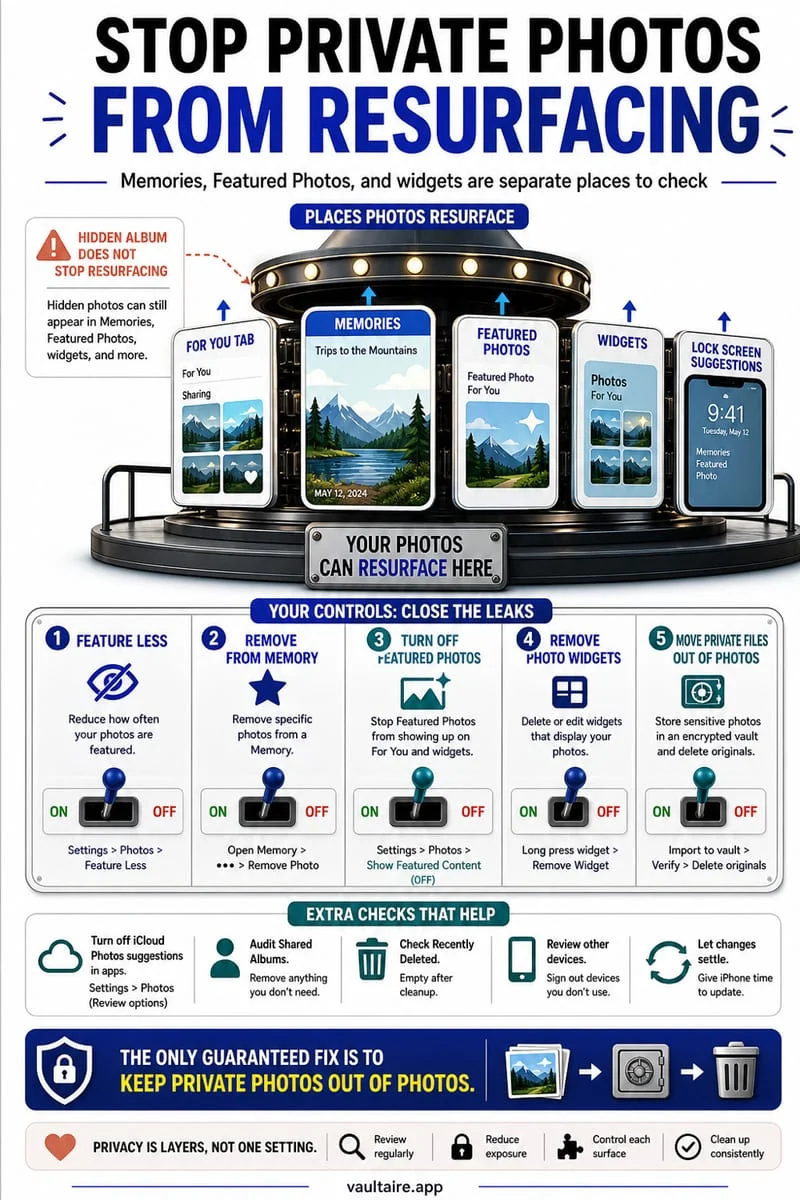
How to Hide Photos From Memories & Featured Widgets on iPhone
Stop awkward or private photos from popping up on your iPhone Home Screen widgets, Memories slideshows, and Featured Photos in 2026.
Read the 6-min guide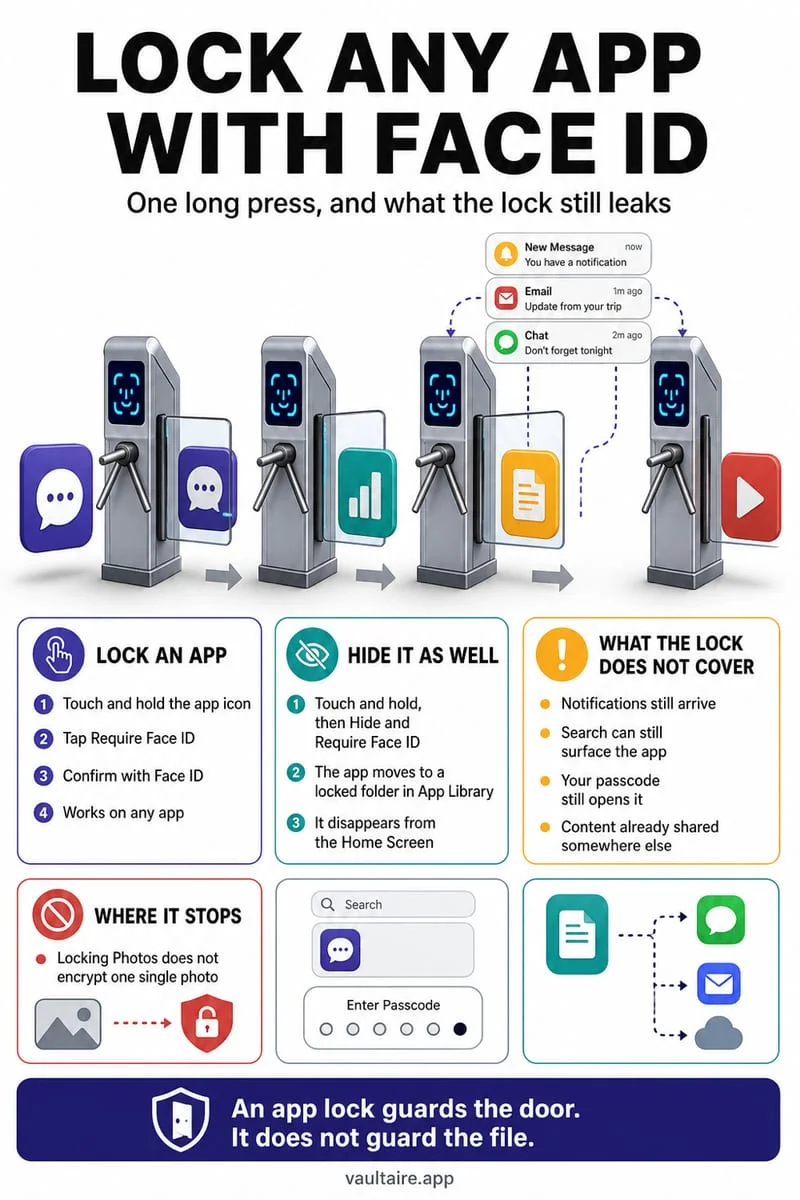
How to Hide & Lock Apps on iPhone With Face ID (2026)
Learn how to lock and hide apps on iPhone with Face ID in 2026, what the iOS Hidden Apps folder does and doesn't protect, and how it compares to an encrypted vault.
Read the 6-min guide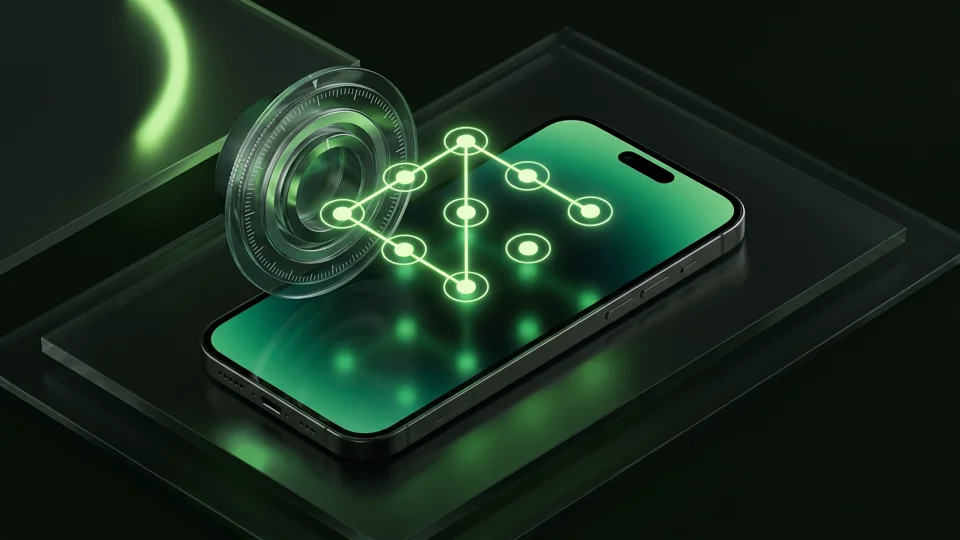
Pattern Lock vs. PIN vs. Passphrase vs. Face ID: Which Lock Is Safer?
Compare PIN, 3x3 Pattern, Safe-style Combination Dial, Passphrase, and Face ID for locking an iPhone photo vault in 2026.
Read the 6-min guide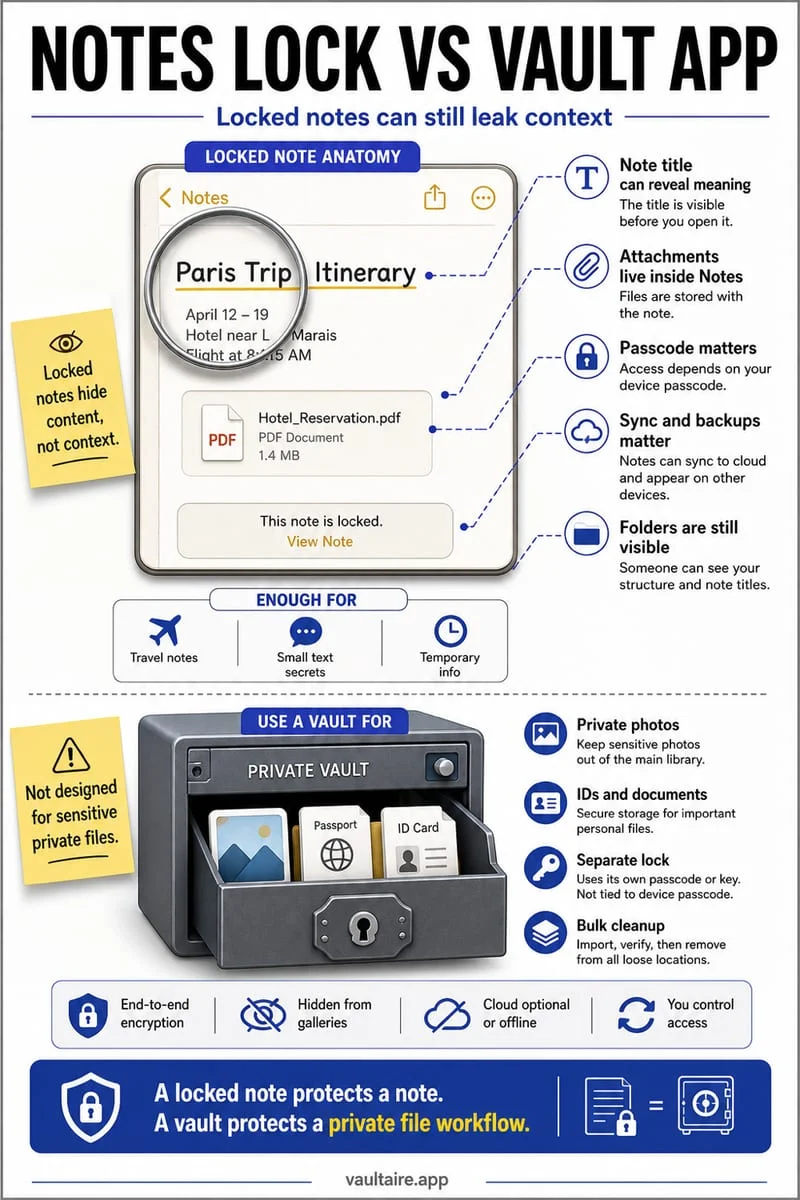
iPhone Locked Notes vs. Photo Vault App: Which Should You Trust?
Should you hide photos inside a locked iPhone Note or use a dedicated encrypted photo vault app in 2026? Compare usability, encryption, and iCloud sync.
Read the 6-min guide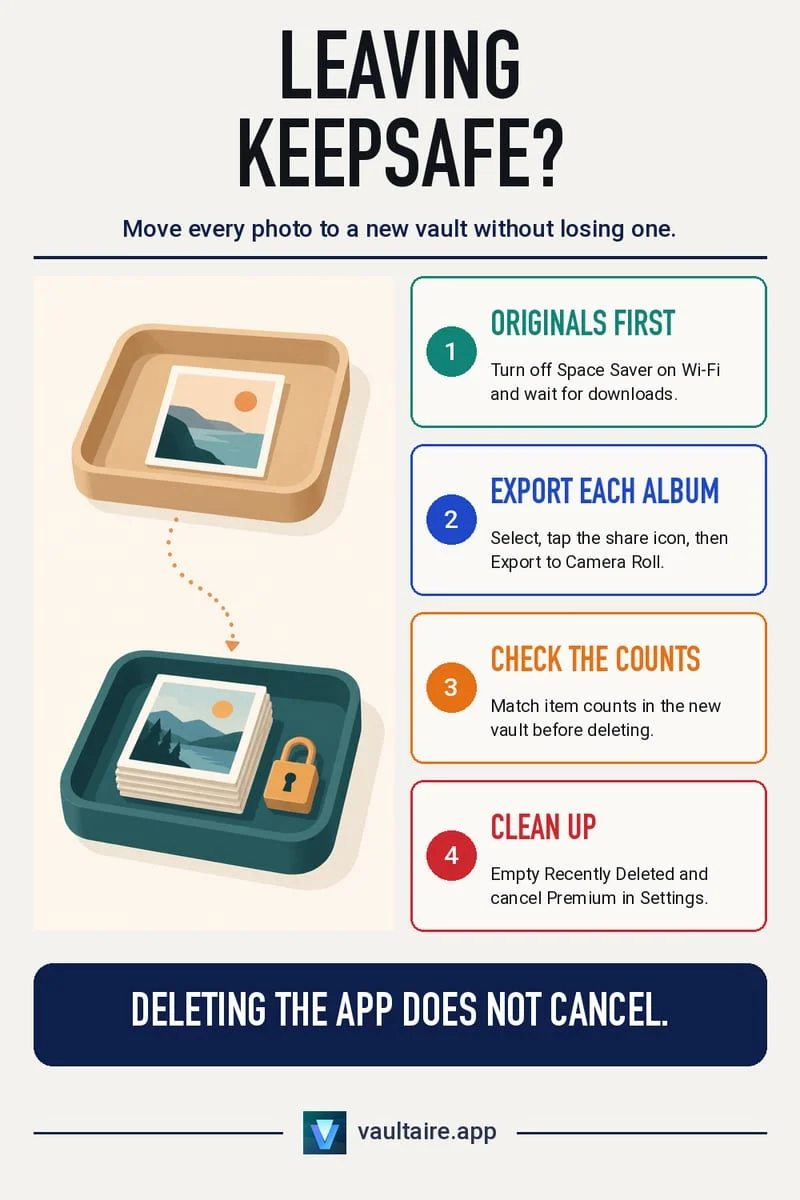
How to Switch From Keepsafe to a Local Encrypted Photo Vault (2026)
Tired of Keepsafe subscriptions, account logins, and cloud uploads? Learn how to export your photos from Keepsafe and migrate to Octoshield's local AES-256-GCM vault.
Read the 6-min guide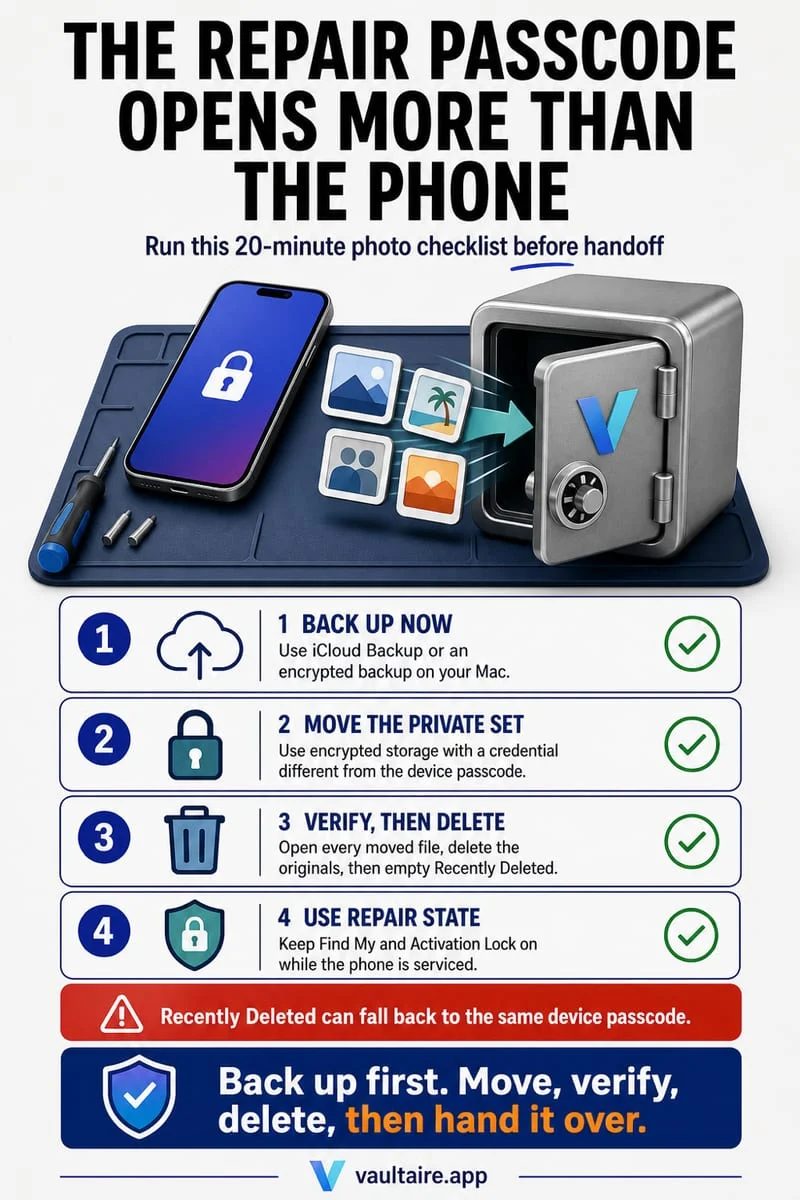
How to Protect Your Private Photos Before an iPhone Repair
Handing your iPhone to a repair shop or Apple Store in 2026? Follow this privacy checklist to protect your photos, files, and passcodes before service.
Read the 6-min guide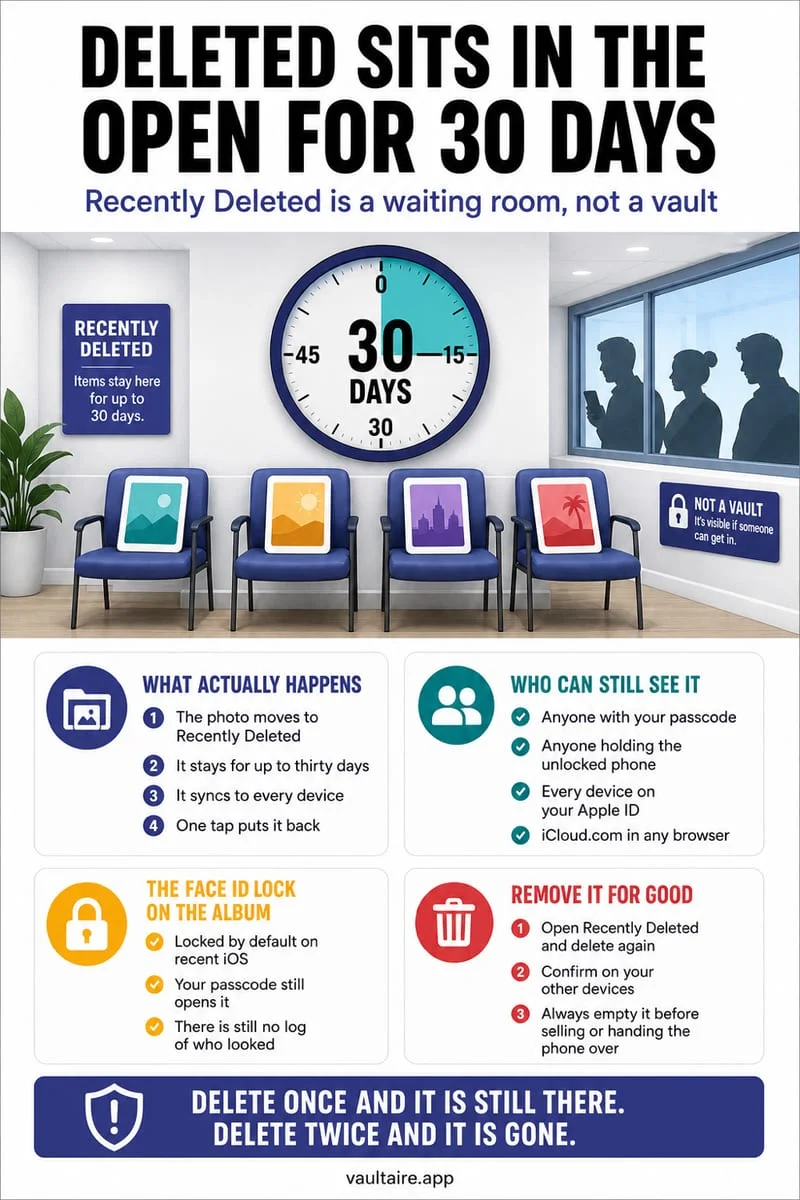
Can Someone See Your Recently Deleted Photos on iPhone? (2026)
Deleted a private photo on iPhone? Learn how long it stays in Recently Deleted, who can see it on your phone or iCloud, and how to purge it permanently.
Read the 6-min guide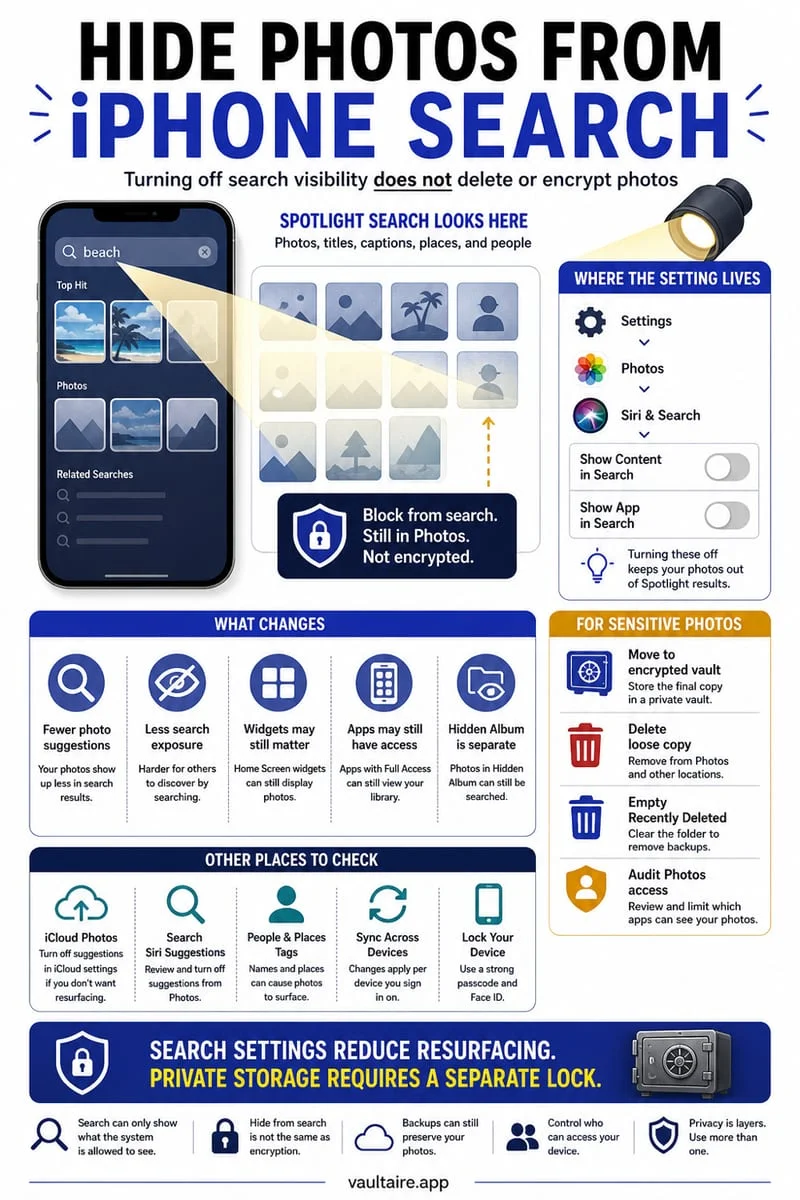
How to Hide Photos From Spotlight Search, Widgets & Siri on iPhone
Stop private photos and text inside screenshots from showing up when someone types into iPhone Spotlight Search, Siri Suggestions, or widgets in 2026.
Read the 6-min guide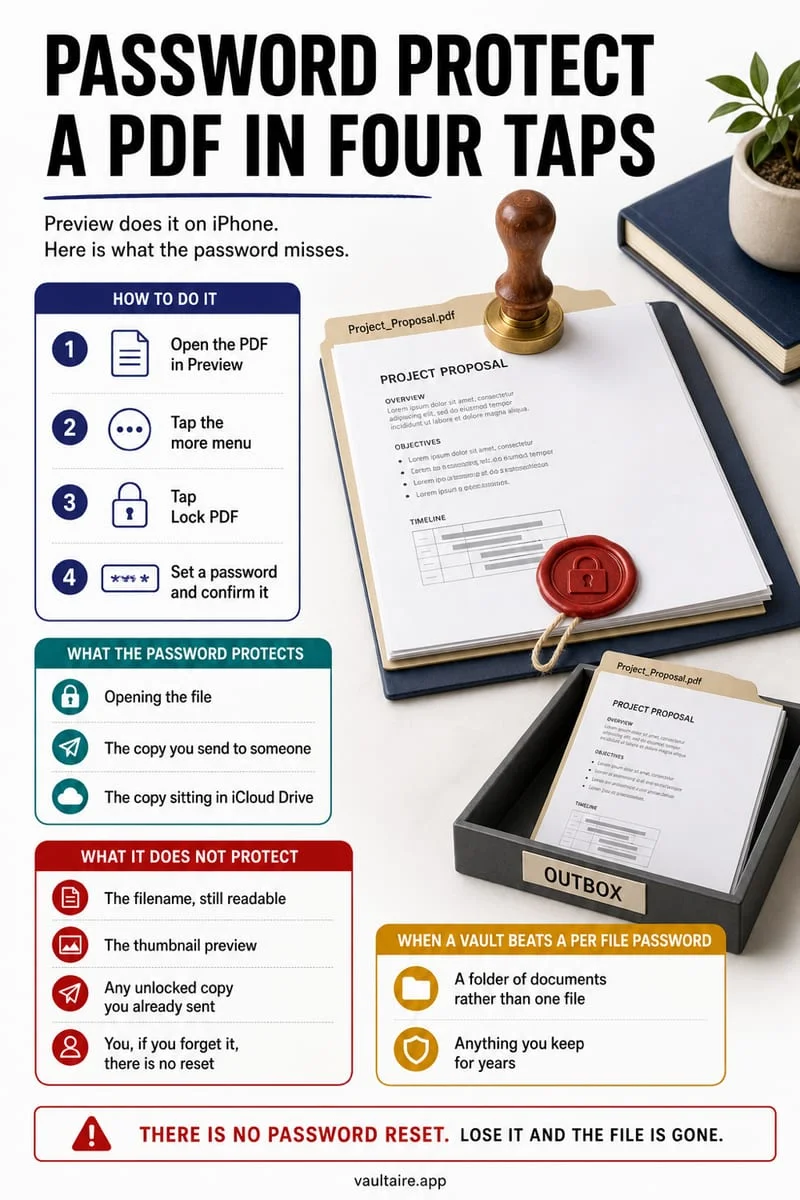
How to Password Protect a PDF on iPhone
Choose protection for a portable PDF or a private vault copy, verify reopening, and review the unprotected source documents left behind.
Read the 3-min guide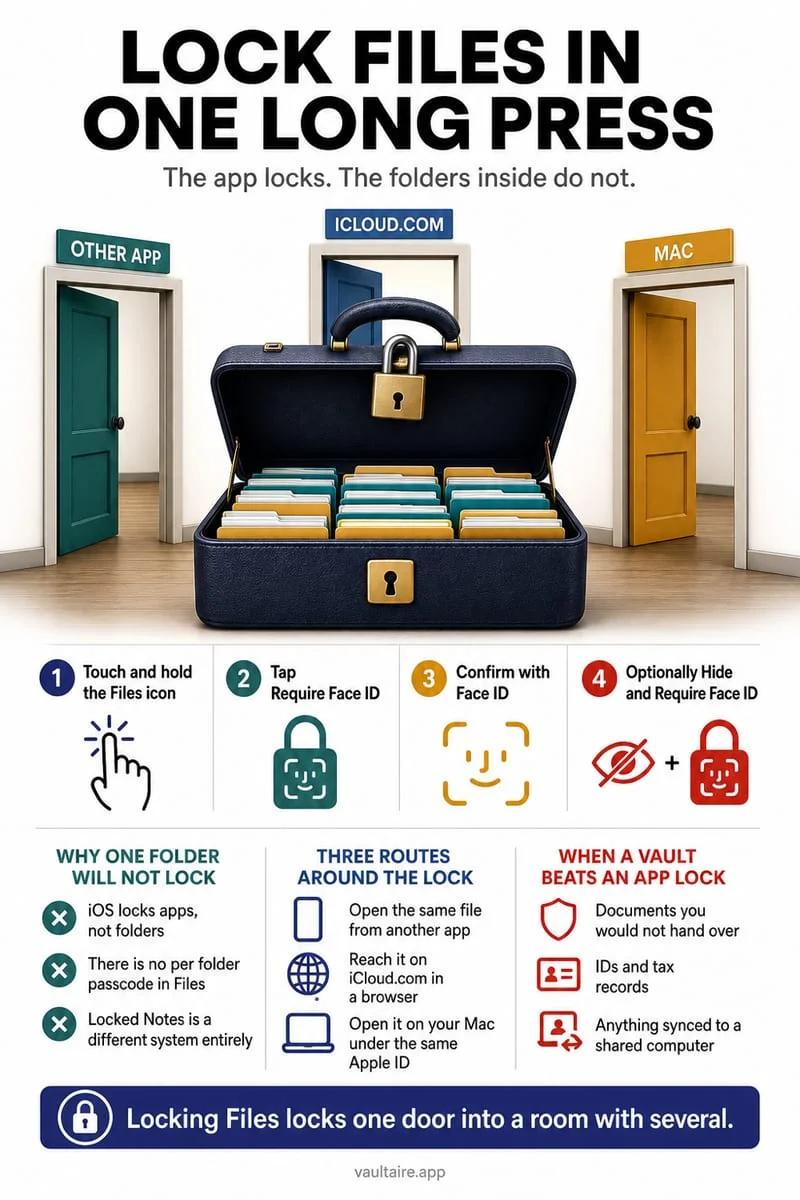
How to Lock the Files App on iPhone in 2026
Learn how to require Face ID for the iPhone Files app, why it shares your iPhone passcode, and how to lock sensitive files behind a separate password.
Read the 6-min guide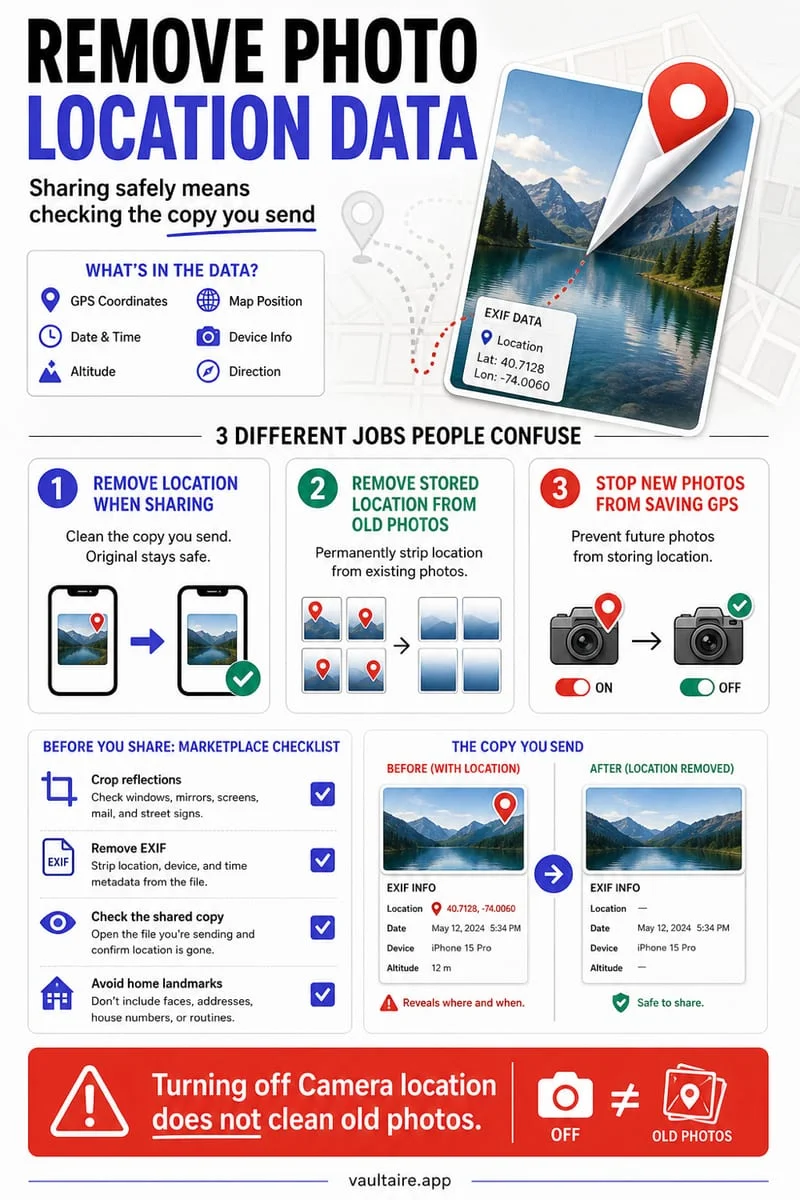
How to Remove Location Metadata From iPhone Photos (2026)
Strip GPS coordinates from iPhone photos before sharing, remove location tags inside the Photos app, or disable Camera geotagging permanently.
Read the 6-min guide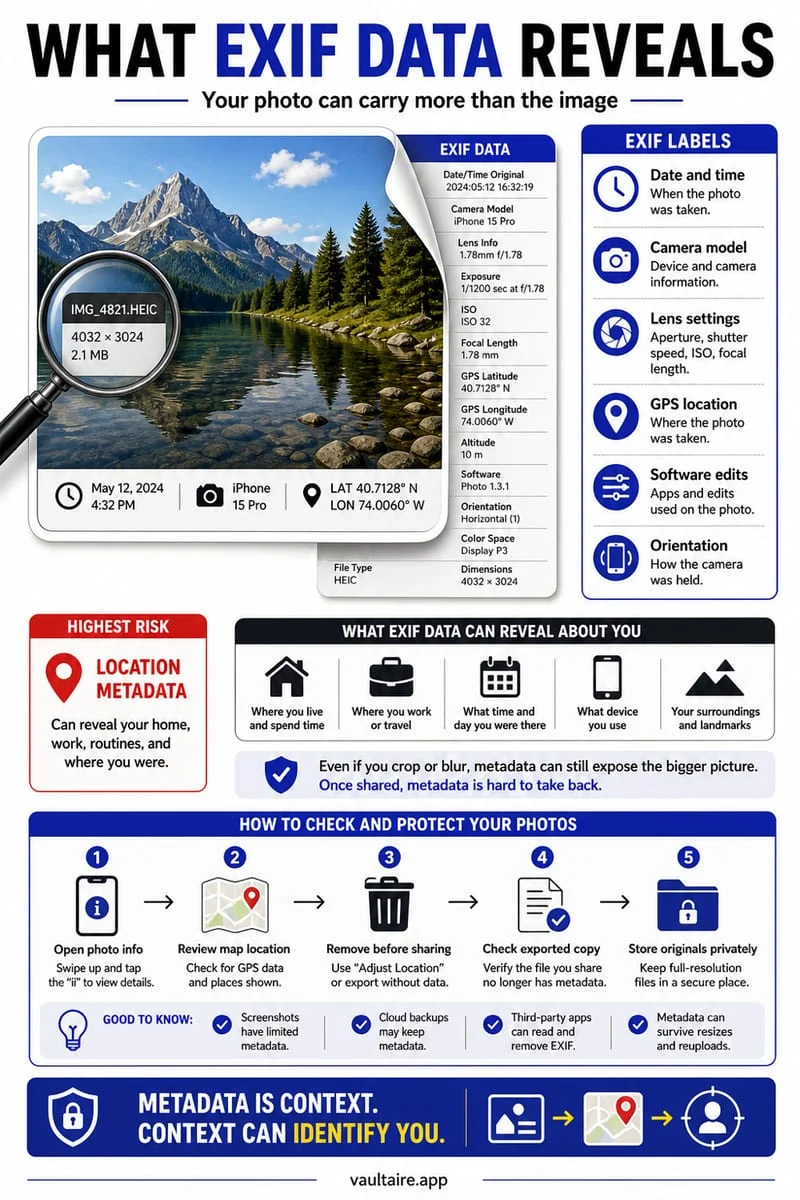
What Is EXIF Data on iPhone Photos? How to View & Remove It
Understand what hidden EXIF metadata is stored inside every iPhone HEIC or JPEG photo—from GPS coordinates to device model—and how to view or scrub it.
Read the 6-min guide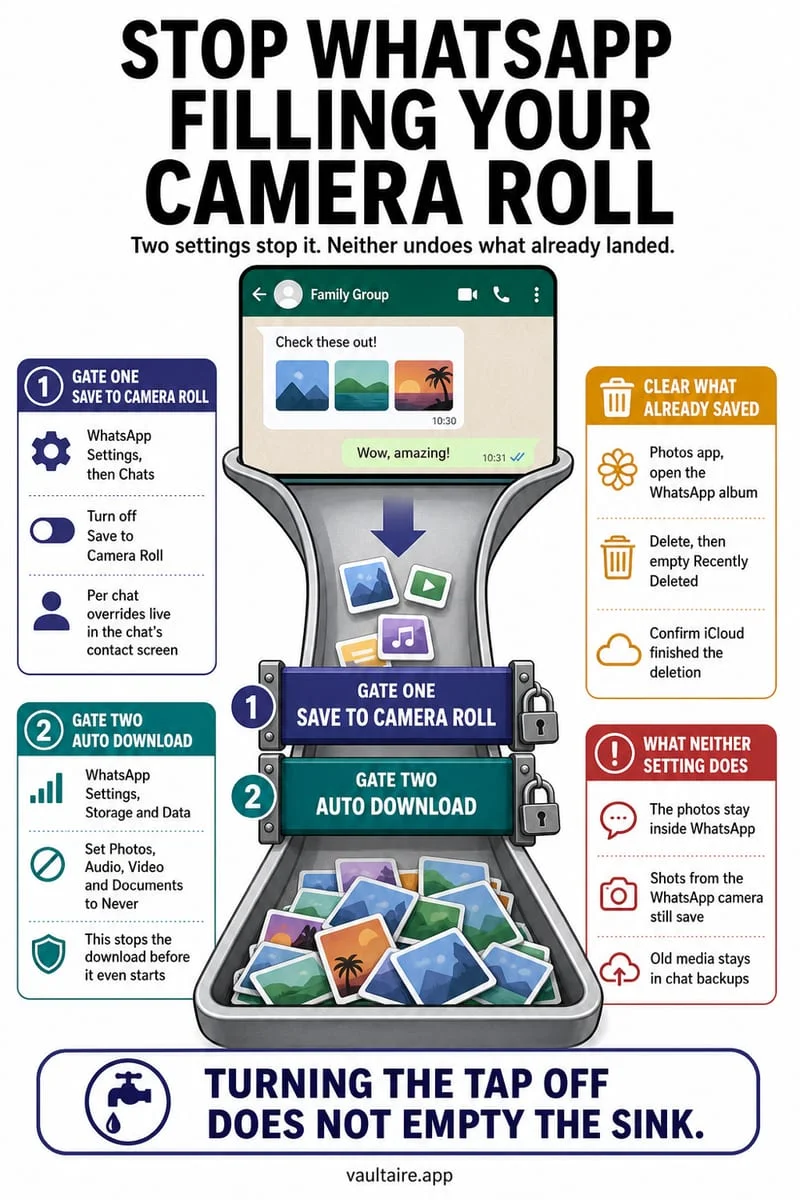
How to Stop WhatsApp Photos From Saving to iPhone Camera Roll
Turn off WhatsApp Save to Photos globally or for specific group chats on iPhone, and clean up thousands of saved WhatsApp memes and media quickly.
Read the 5-min guide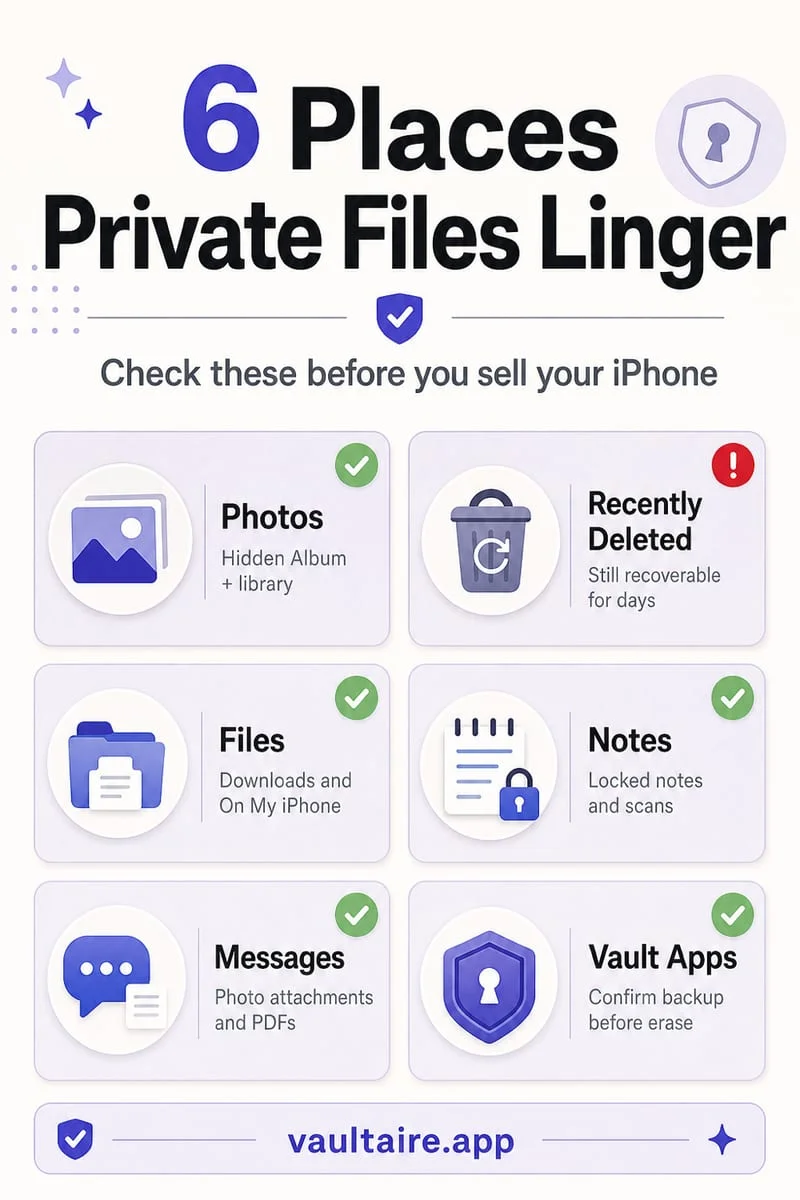
How to Wipe Your iPhone Before Selling or Trade-In (2026 Checklist)
Complete 2026 checklist to safely erase your iPhone before selling or trading it in without accidentally deleting your iCloud photos or losing local vault files.
Read the 6-min guide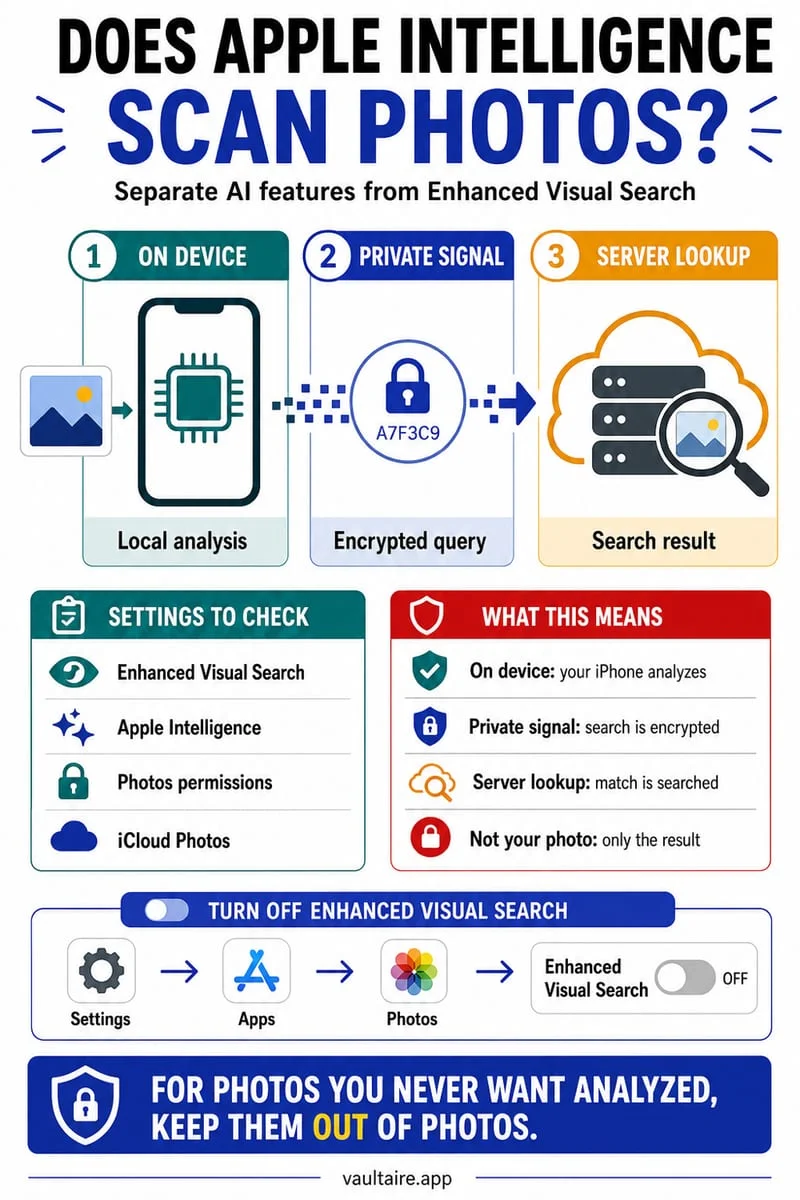
Does Apple Intelligence Scan Your Photos on iPhone? (2026 Privacy Guide)
Learn how iOS indexes your iPhone photo library for Apple Intelligence, Visual Look Up, and Enhanced Visual Search—and how to isolate private photos.
Read the 6-min guide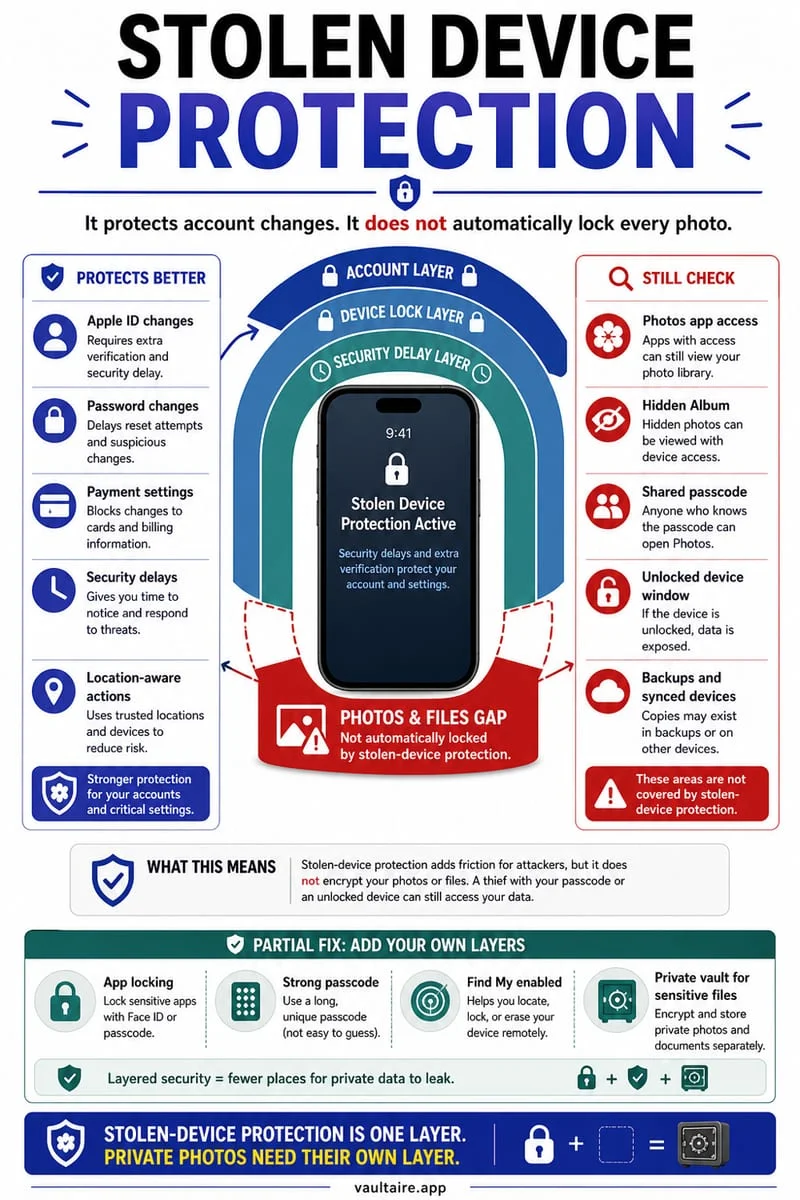
iPhone Stolen Device Protection: What It Protects (And What It Doesn't)
Learn what iPhone Stolen Device Protection actually blocks when a thief knows your passcode, why your Photos app is still vulnerable, and how to add a second password.
Read the 6-min guide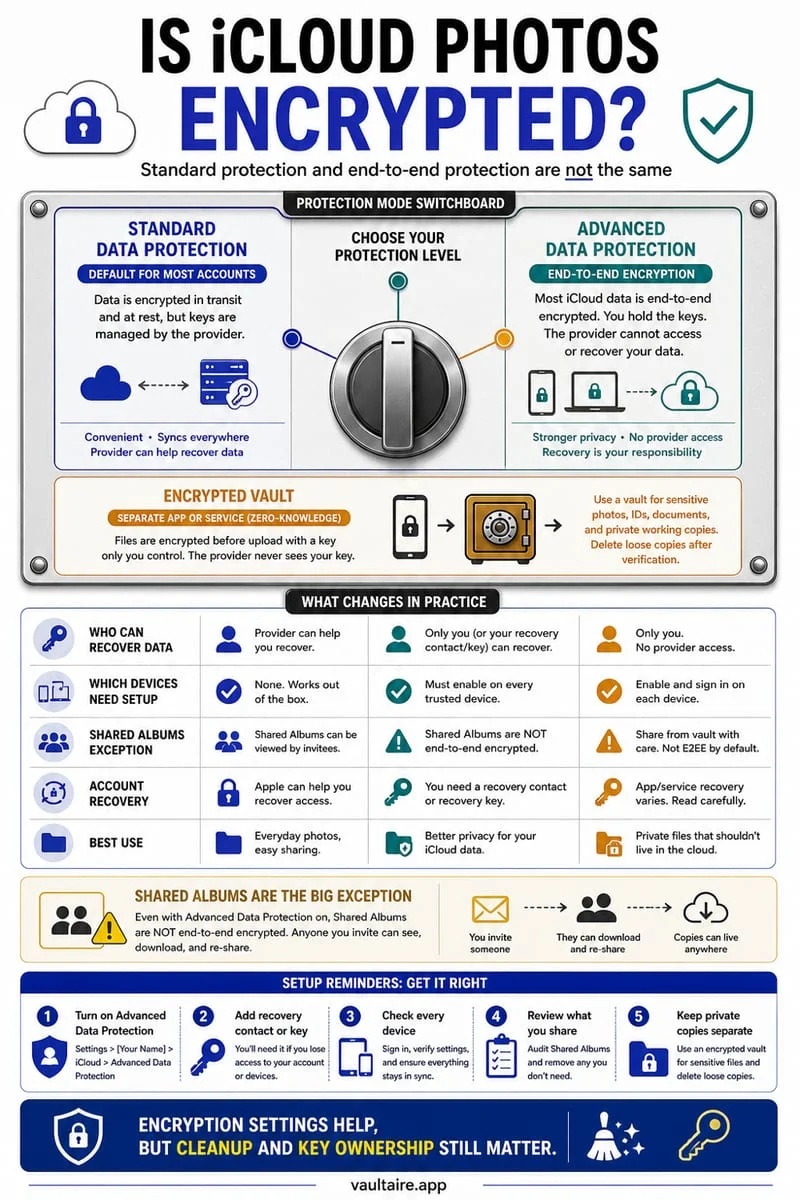
Are iCloud Photos End-to-End Encrypted? Standard vs. Advanced Data Protection
Find out whether iCloud Photos are end-to-end encrypted by default, how Apple's Advanced Data Protection works, and how it compares to a local AES-256-GCM vault.
Read the 6-min guide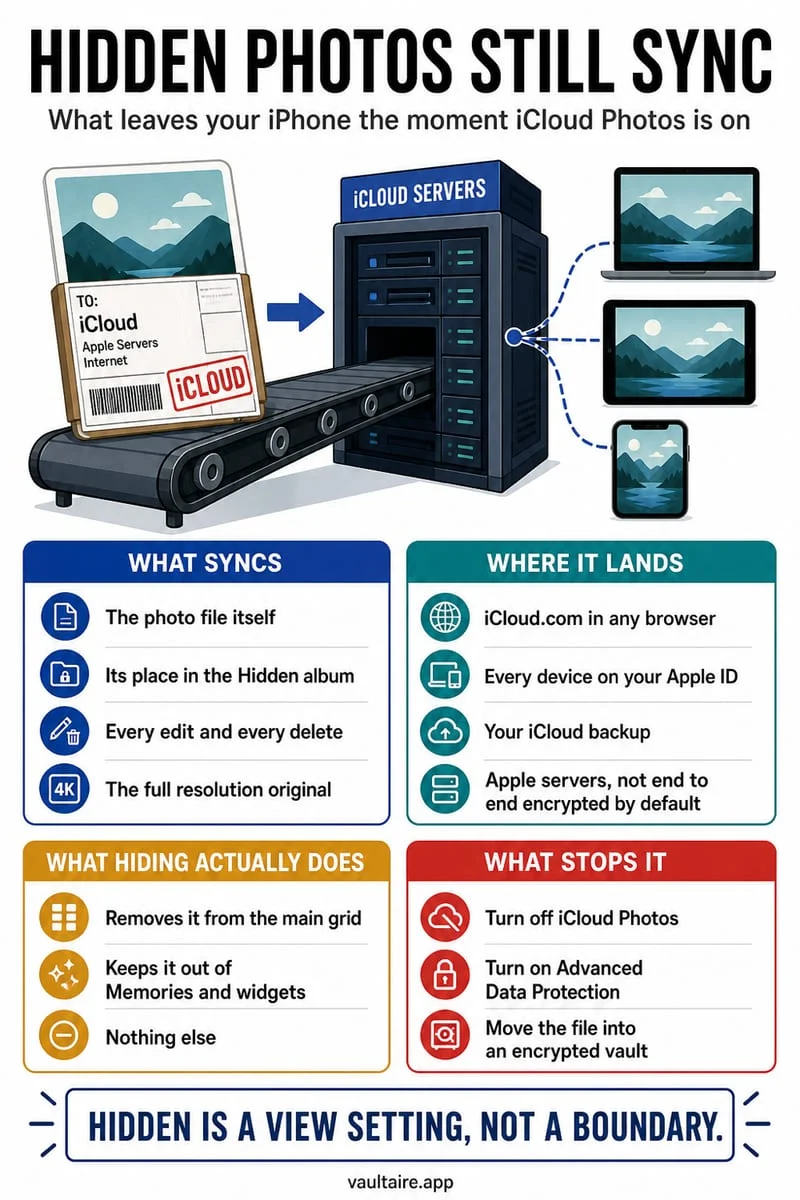
Are Hidden Photos on iPhone Backed Up to iCloud? (2026 Answer)
Learn whether photos in the iPhone Hidden album sync to iCloud Photos or iCloud Backups, where else they appear, and how to keep hidden photos strictly offline.
Read the 6-min guide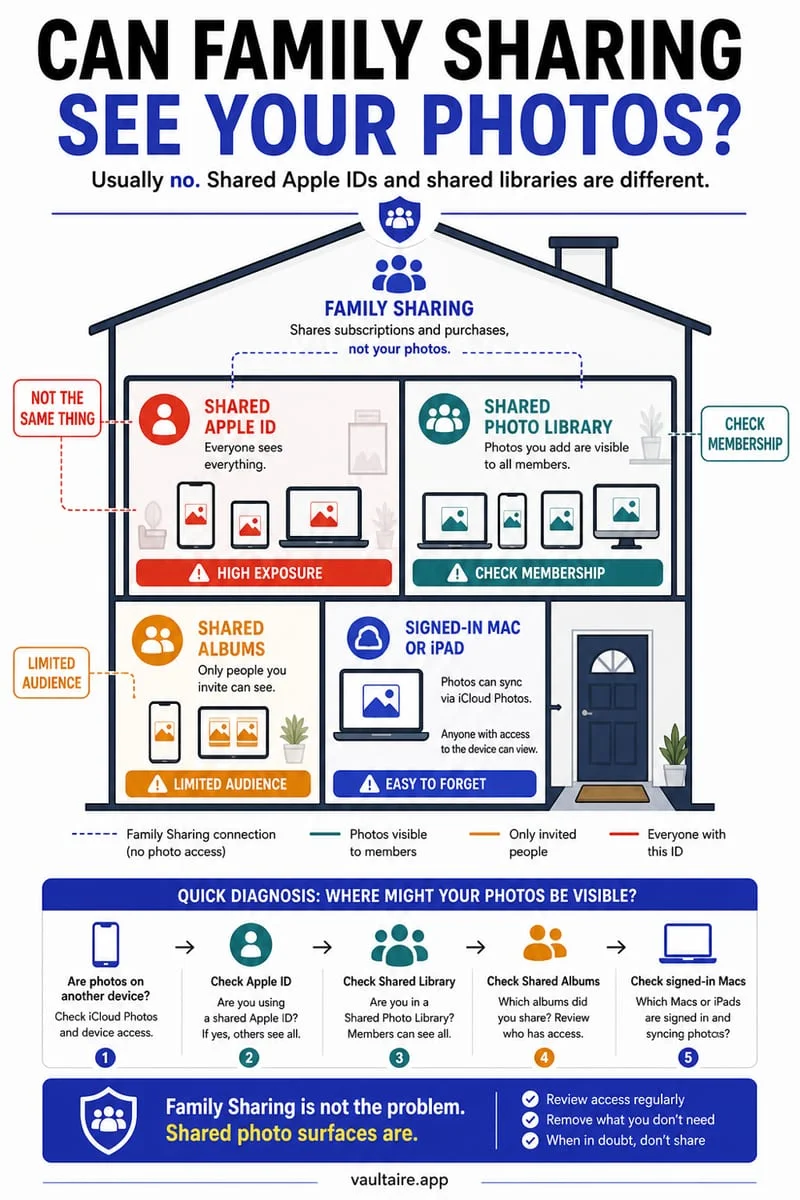
Can Family Sharing See Your iPhone Photos or Hidden Album?
Clear up the confusion between Apple Family Sharing, iCloud Storage sharing, and iCloud Shared Photo Library—and find out when family members can see your photos.
Read the 6-min guide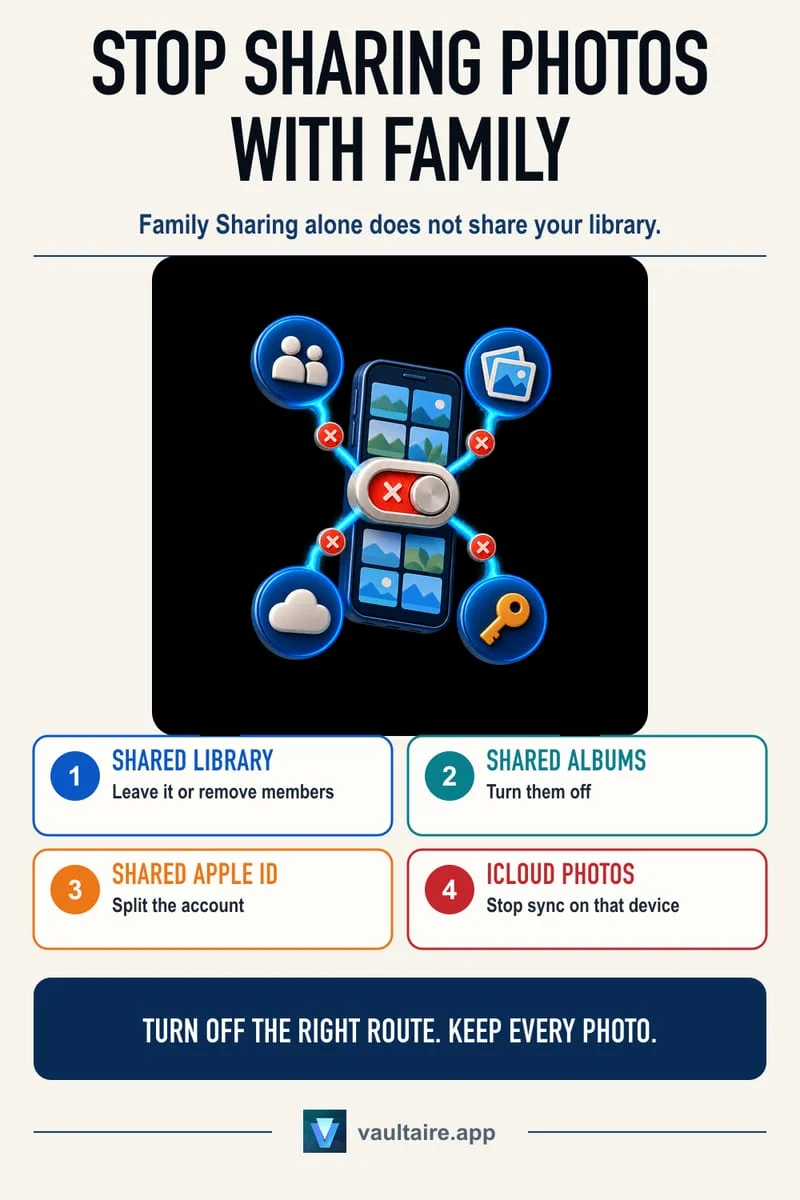
How to Stop Sharing Photos With Family on iPhone: 4 Settings to Turn Off
Stop your iPhone from automatically sending photos to family members by turning off Camera Shared Library auto-sharing, Shared Albums, and NameDrop/AirDrop triggers.
Read the 6-min guide
Best Swipe Photo Cleaner Apps for iPhone in 2026 (Local & Private)
Compare the best iPhone swipe photo cleaner workflows in 2026, what to watch out for with cloud-based AI cleaners, and how Octoshield cleans and vaults locally.
Read the 6-min guide
How to Free Up Photo Storage on iPhone Without Losing Memories (2026)
Reclaim gigabytes of iPhone storage taken up by Photos using Optimize iPhone Storage, 4K video cleanup, duplicate merging, and fast swipe decluttering.
Read the 6-min guide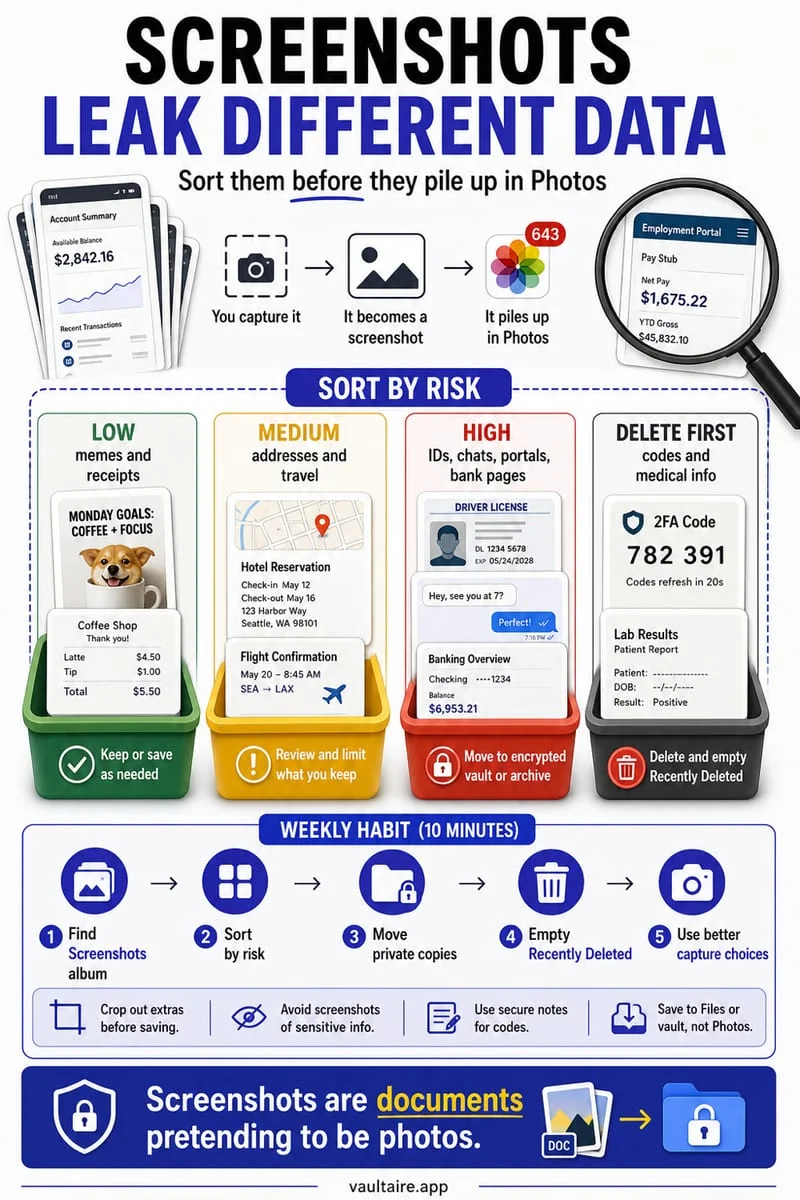
How to Keep Screenshots Private & Out of Your iPhone Camera Roll
Stop sensitive screenshots of banking details, messages, and confirmation codes from cluttering your iPhone Camera Roll, widgets, and iCloud Photos.
Read the 6-min guide
How to Scan & Store ID Documents and Passports Privately on iPhone
Learn the safest way to scan your passport, driver's license, and identity cards on iPhone without leaving them exposed in your Camera Roll or unencrypted cloud folders.
Read the 6-min guide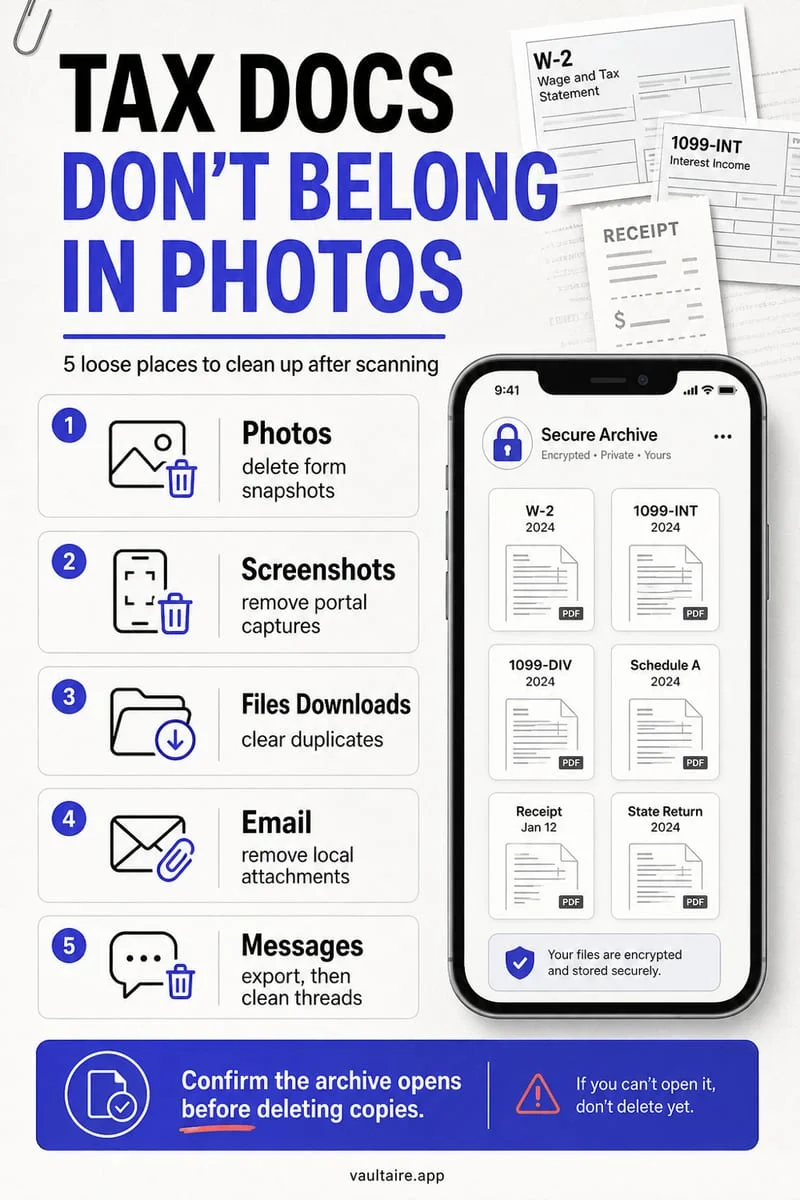
How to Store Tax Returns & Financial PDFs Safely on iPhone
Keep tax returns, W-2s, 1099s, bank statements, and mortgage PDFs accessible on your iPhone with on-device AES-256-GCM encryption and zero cloud exposure.
Read the 6-min guide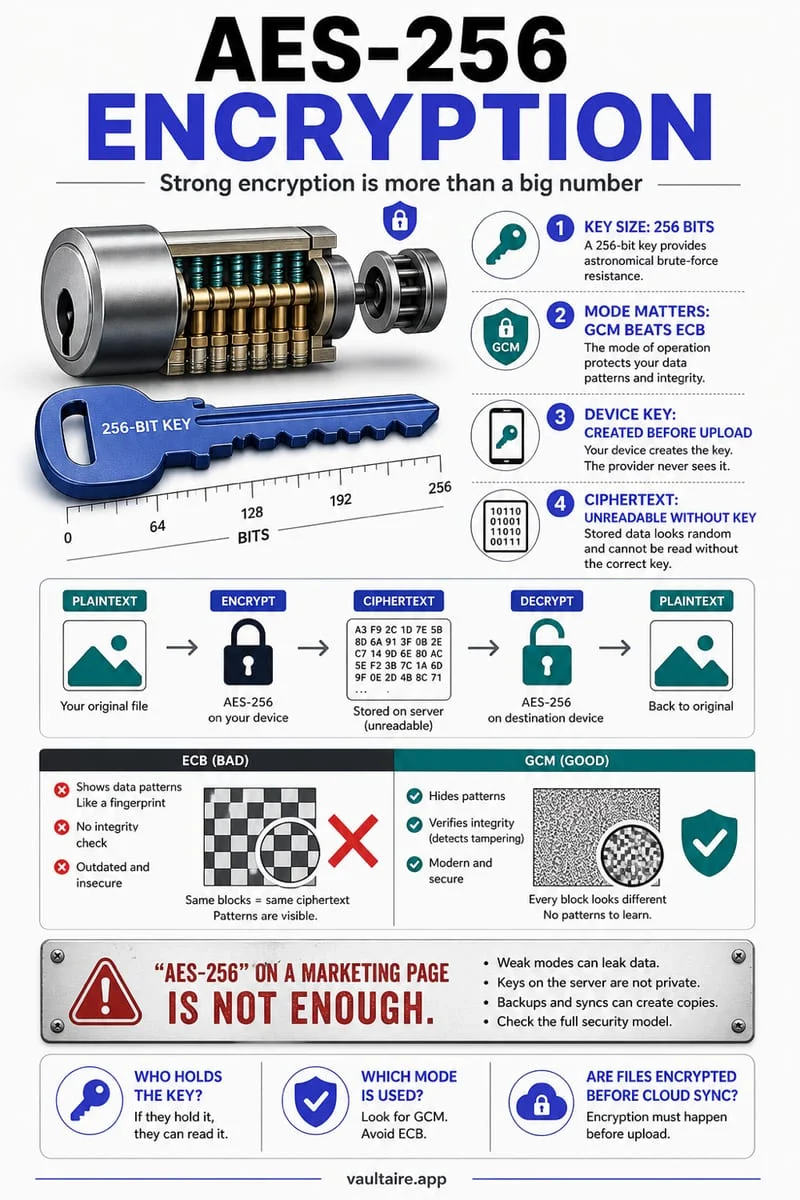
AES-256-GCM Encryption Explained: How On-Device File Encryption Works
Plain-English technical guide to AES-256-GCM authenticated encryption, why fake vault apps fail, and how Octoshield protects photos and files on iPhone.
Read the 6-min guide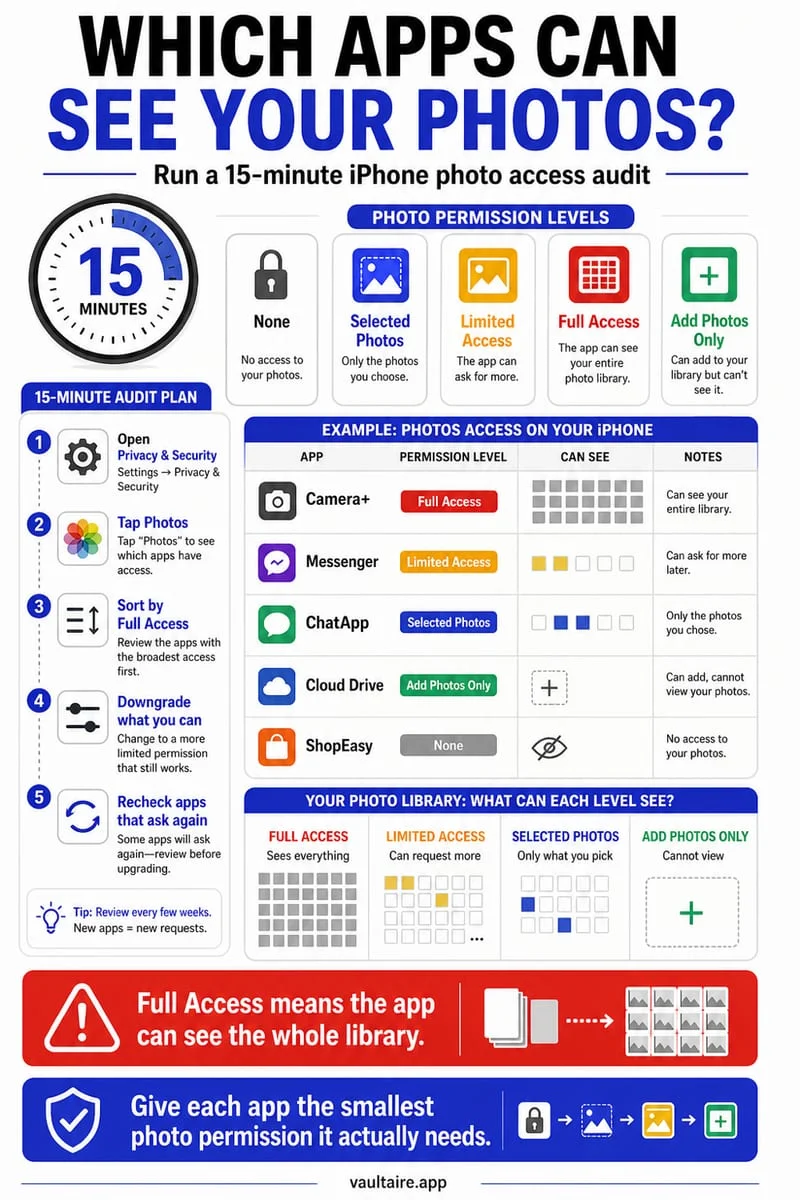
Which Apps Can See Your iPhone Photos? How Limited Access Works
Check which third-party apps have Full Access to your iPhone Camera Roll right now, understand Private Access vs. Limited Access, and isolate private photos.
Read the 6-min guide
A cleaner camera roll.
A more private iPhone.
Keep what matters. Protect what’s personal.
Download for freeFree to download · For iPhone