In Photos, touch and hold a picture and choose Hide, then confirm. For several pictures, select them and use the available Hide action. Find them later under Hidden in Utilities. To remove the Hidden row, turn off Show Hidden Album in Photos settings. Use separate vault storage if you need another secret.
Hide one photo or a selected group
A private snapshot does not need to appear while you scroll through holiday pictures. Apple Photos includes a built-in Hide action for this everyday situation, without another download. Open the picture, touch and hold it, and choose Hide. For a group, select the intended items and use the available action menu.
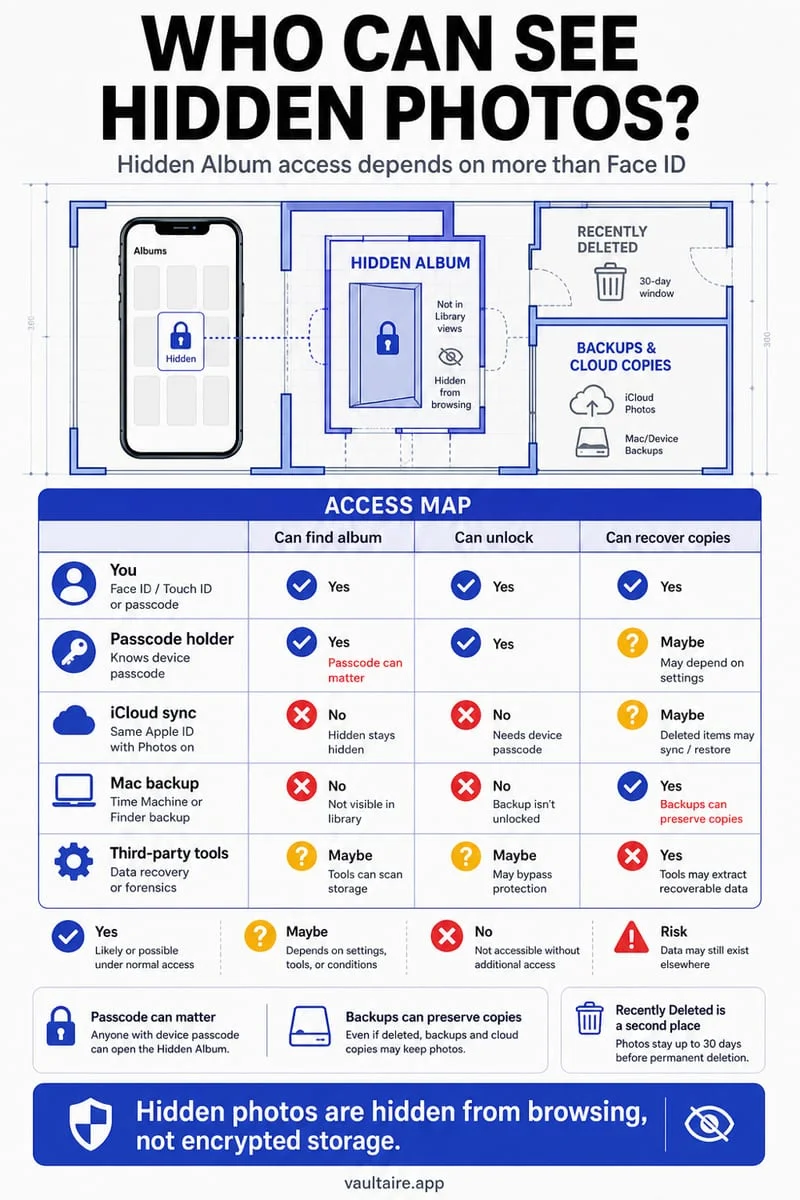
Check your selection before confirming. Hidden items remain in the library but leave normal library views, other albums, and Photos widgets. Hiding does not compress the file or free storage.
- Open Photos and locate the picture or group.
- Touch and hold one picture, or select several and open the action menu.
- Choose Hide and confirm.
- Open Hidden under Utilities to verify the result.
Hide the Hidden album row too
Open Settings → Apps → Photos and turn off Show Hidden Album. This makes the collection less obvious in Photos. Turn the setting back on when you need to find the items again, then authenticate to open them.
This display switch is not a second password. Someone able to change the setting can reveal the row again. Device authentication, account access, and library sharing remain separate considerations.
Know what hiding does not change
If iCloud Photos is enabled, hidden items and their hidden state synchronize with the library. A normal album is not a private backup, and hiding a Shared Library item does not remove other participants’ access.
Files already copied into Google Photos, messages, or another folder need separate review. One Hide action in Apple Photos is not a command to every service that has ever received the same image.
Use Octoshield when you need a separate secret
Octoshield stores imported photos and videos outside Photos in a local encrypted vault. Choose a PIN, passphrase, pattern, or dial, and verify the imported files before deciding what to do with the originals.
Photos deletion requires its own confirmation and follows iCloud Photos sync rules. Review Recently Deleted deliberately. The vault is excluded from backups and has no recovery service; export essential material before changing devices.

A little privacy for your photos.
Download for freeFrequently asked questions
01How do I hide photos on my iPhone for free?+
Use Apple Photos’ built-in Hide action. You do not need an additional app for the standard Hidden collection.
02How do I put photos in the Hidden album?+
Choose the photos in Photos and use Hide. They move out of ordinary views into the built-in Hidden collection.
03Can I hide photos without deleting them?+
Yes. Hide retains the photos in the library. It changes visibility rather than removing the files.
Official sources & further reading
iOS menus can vary slightly by iOS version. Octoshield instructions describe the current local app implementation engineered by TengrX. Check the App Store listing for the version available to download.