An export intended for another app normally creates a usable copy outside the vault. That copy follows the destination’s protection, sharing, and backup rules; it is not automatically protected by your vault secret. Verify where it went and manage it separately from the retained encrypted original.
The file crosses a storage boundary when another app receives it
You unlock a private PDF and send it to an editor. The editor needs access to readable contents to do its work. Your vault can still protect its own retained copy while the editor holds a new version elsewhere.
This is why “encrypted in my vault” and “encrypted wherever I send it” are different claims. Check the export format and destination. Unless the workflow explicitly creates a protected package, do not assume the vault password travels with the file.
Check both the receiving app and its save location
Save to Files, Save Image, Mail, and another app’s import action can produce different destinations. A document editor may also keep autosaved drafts or cloud copies. Inspect the resulting file rather than treating a completed Share action as the end of the workflow.
For an export you intend to preserve, open the whole file and verify quality, pages, or playback. For an export made only for temporary use, know where to remove the temporary copy afterward. Deleting the vault original will not necessarily clean that destination.
- Choose the destination and inspect its sync or sharing rules.
- Export only the version you intend to use.
- Open the received copy and verify its contents.
- Manage temporary copies separately when the task is finished.
A portable copy can be useful without becoming automatically private
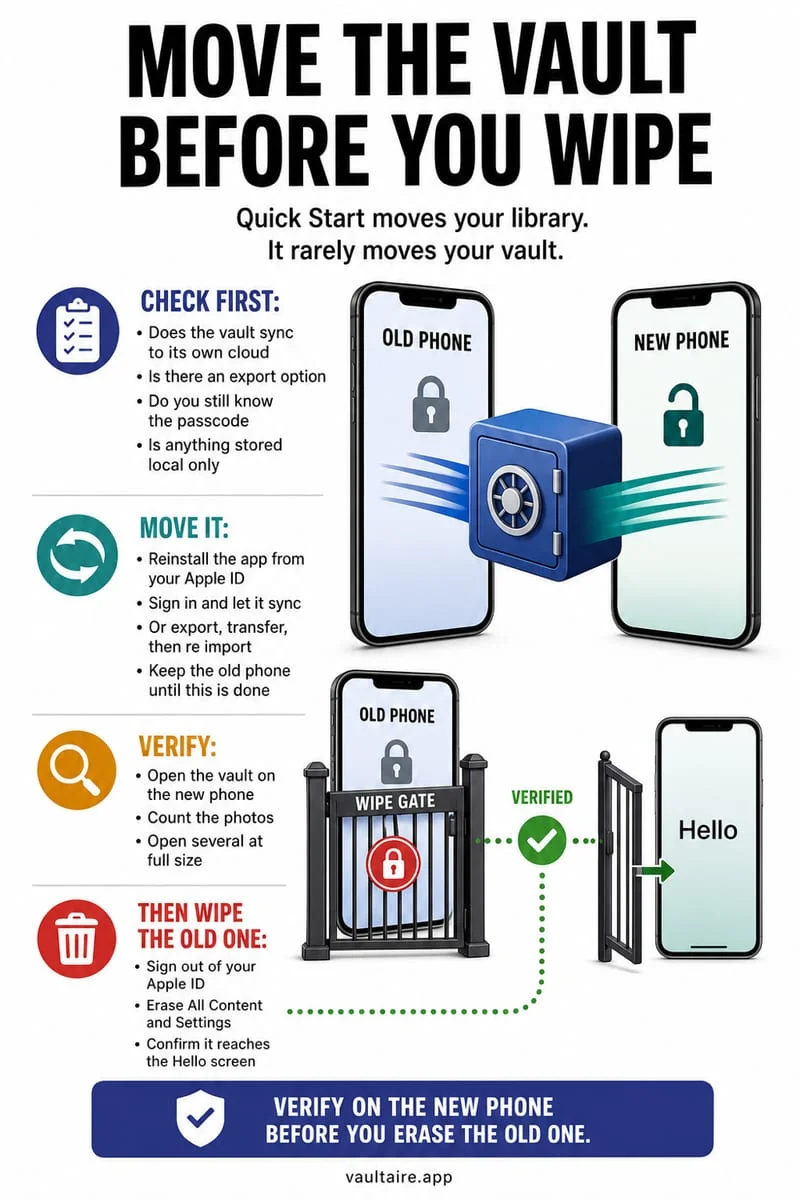
Export can be part of preserving essential documents before a phone change. If your vault is device-bound or excluded from backups, waiting until the old device is gone is too late. Verify independent copies while you still have access.
If the backup destination needs its own encryption, use a method designed for that purpose and test retrieval. A plaintext export stored in a folder called Backup is not equivalent to an encrypted archive.
Export deliberately from Octoshield
Octoshield’s encrypted vault is local, excluded from backups, and has no recovery service. Export essential files before changing devices and verify the destination copy before removing anything from the old phone.
Some document previews use temporary decrypted files, and exported copies leave vault protection. Keep the vault secret memorable and choose the receiving location as carefully as the original private storage location.
Frequently asked questions
01Does my vault password protect the exported PDF?+
Do not assume it does. A normal readable export follows the destination’s protections unless an explicit protected-export workflow says otherwise.
02Will deleting the vault copy delete earlier exports?+
No. Earlier exported files can exist independently in Photos, Files, other apps, or recipients’ storage.
Official sources & further reading
Keep sensitive PDFs, IDs & documents in an encrypted iPhone vault.
The iOS Files app leaves filenames and folders exposed whenever your phone is unlocked. Import tax returns, passport scans, and private PDFs into Octoshield for hardware-bound AES-256-GCM protection.
- Encrypts PDFs, scans, documents, photos, and videos on-device
- Hides document filenames inside an encrypted catalog index
- Automatic cleanup of temporary preview scratch files on lock
- PBKDF2-SHA256 + iPhone Keychain hardware key binding
 AES-256-GCM + Cleaner
LOCAL IPHONE SANDBOX · KEYCHAIN BOUND
iOS menus can vary slightly by iOS version. Octoshield instructions describe the current local app implementation engineered by TengrX. Check the App Store listing for the version available to download.