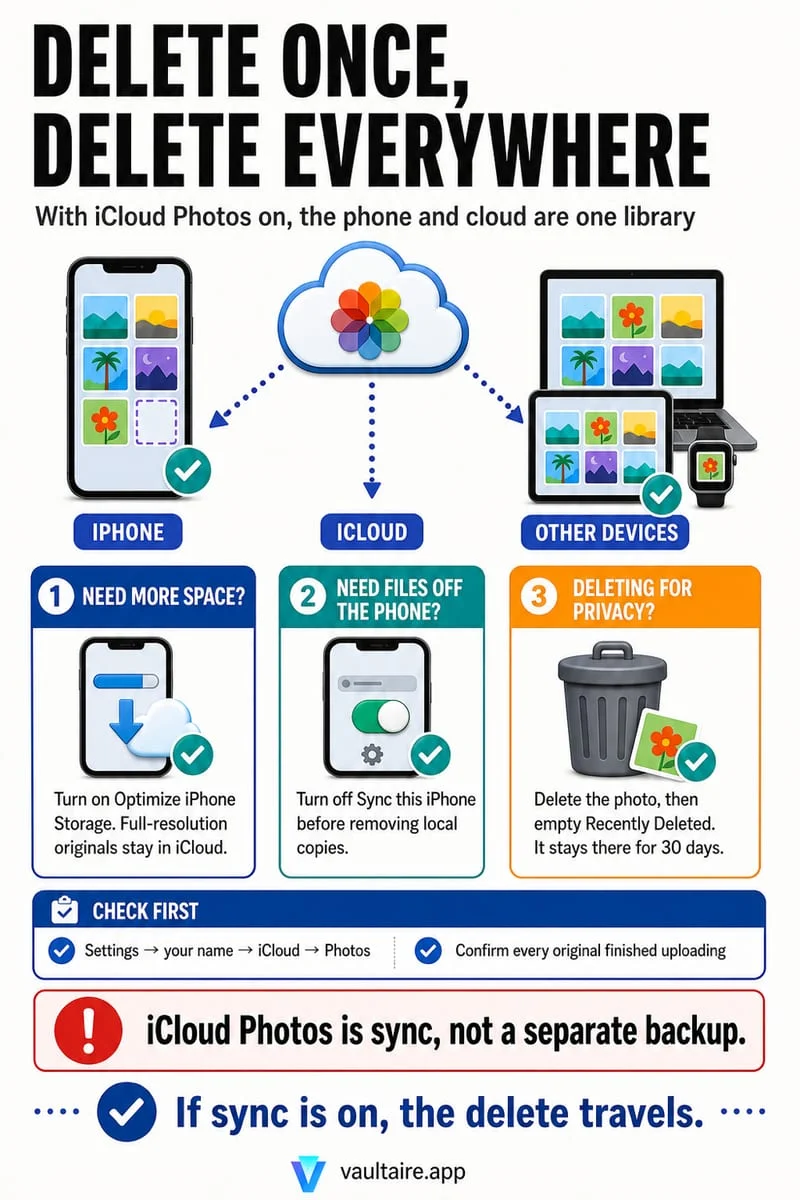
Optimize iPhone Storage replaces some local full-resolution files with smaller versions when space is needed; the originals remain in iCloud Photos. It does not remove those pictures from your library. Tapping Delete is different: with iCloud Photos enabled, deletion syncs across that library.
Your photo is still there; its local version can change
A holiday picture still appears in your grid after you turn on optimization. That does not mean the setting failed. Photos can display a smaller local version and retrieve the original when you need to edit, share, or export it. Library visibility and the size of the local file are separate things.
This arrangement depends on having a completed cloud copy and enough iCloud storage. Before relying on it, open your Photos account status and check for paused uploads or unsynced items. A picture waiting to upload should not be treated as safely stored elsewhere.
Choose optimization without choosing deletion
Open Settings and inspect the Photos options under your Apple Account’s iCloud settings. Choose Optimize Storage rather than Download and Keep Originals. Some versions place these choices inside an iPhone Storage submenu. Let the phone finish its existing uploads before judging the result.
There is no promised amount of space or fixed completion time. Optimization responds to storage pressure, and opening many older photos can download larger files again. Check actual device storage rather than expecting the number of thumbnails to fall.
- Check Photos sync status and available iCloud space.
- Choose Optimize Storage in iCloud Photos settings.
- Allow network access and background processing, then compare device storage later.
Do not delete a picture to force optimization
Deleting a library photo is not a request to remove only its download. If iCloud Photos is on, it also removes that item from the synced library. Recently Deleted gives you a limited recovery window, not an independent archive.
If you want an independent copy, export one to another storage location and open it there before changing the library. A second album inside Photos does not meet that requirement because it still refers to the same library item.
Use Octoshield for the photos you no longer want
Optimization is for keeping your collection while reducing some local storage. Octoshield’s Cleaner is for deciding which pictures deserve to remain at all: swipe right to keep, left to queue deletion, or up to create a private vault copy and queue the original.
Review the queue before confirming. The vault stores files on this iPhone, so it is a privacy option rather than cloud storage or a guaranteed way to save space.
Frequently asked questions
01Will my photos become blurry forever?+
The full-resolution originals remain in iCloud when sync has completed. Viewing or exporting them may require an internet connection to download the originals.
02Can I turn optimization off?+
Yes. Choose Download and Keep Originals, provided you have enough device space for the library. Downloading a large collection takes time and network access.
Official sources & further reading
Clean your iPhone camera roll one swipe card at a time.
Review cluttered photo batches without grid fatigue: swipe left to queue unwanted shots for deletion, swipe right to keep memories in Apple Photos, or swipe up to encrypt private photos straight into your vault.
- Tactile 3-way card review: Left delete, Right keep, Up vault
- Safe review queue + instant Undo before iOS removes anything
- Built-in AES-256-GCM encrypted photo, video & file vault
- 100% local processing on your iPhone — free to download
 AES-256-GCM + Cleaner
LOCAL IPHONE SANDBOX · KEYCHAIN BOUND
iOS menus can vary slightly by iOS version. Octoshield instructions describe the current local app implementation engineered by TengrX. Check the App Store listing for the version available to download.