Calculator vault apps on iPhone disguise themselves as working calculators that open a hidden gallery when you type a secret number and press '='. While clever as visual camouflage, many calculator apps store your photos unencrypted on disk, inject ad trackers, or sell cloud subscriptions—making a real AES-256-GCM encrypted local vault like Octoshield far safer for genuine security.
How calculator vault apps work on iPhone
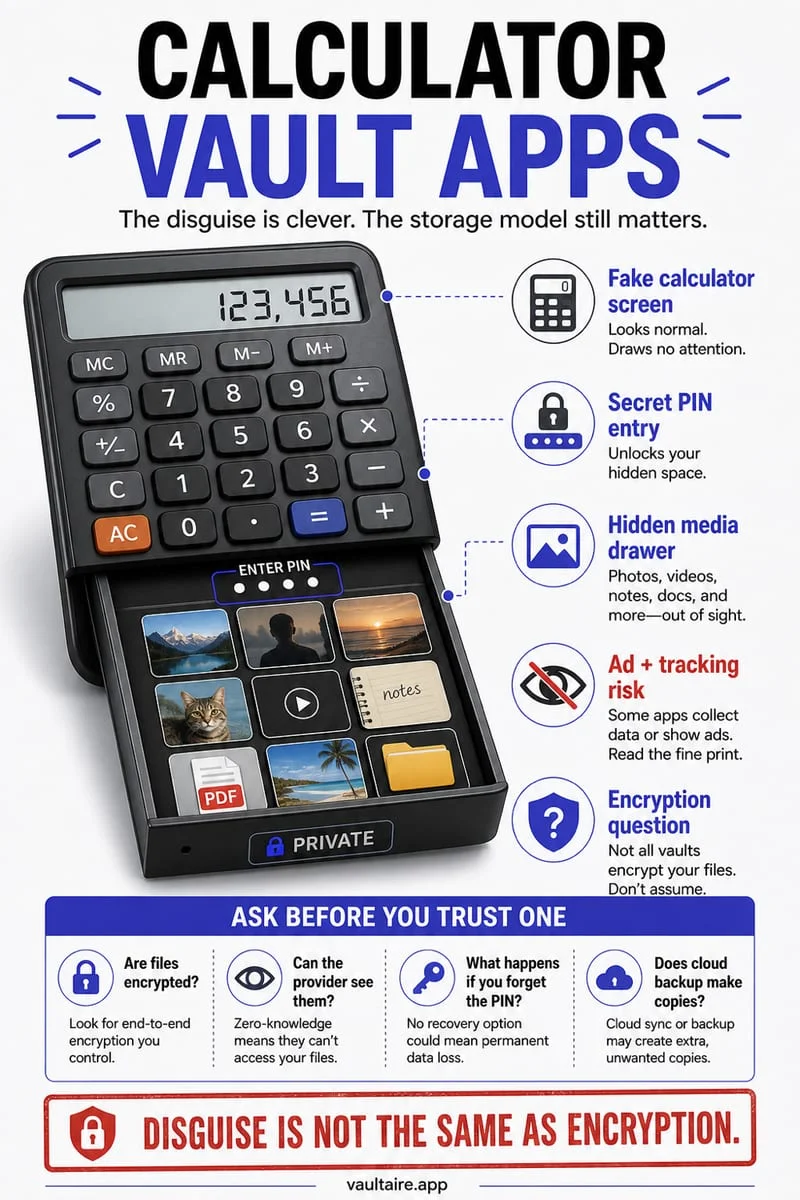
A calculator vault app—often listed on the App Store as Calculator#, Secret Calculator, or Calc Box—renders a working arithmetic calculator when launched. Only when you type a pre-configured numeric sequence (for instance, `7391` followed by `=` or `%`) does the view controller transition to a hidden photo and video gallery.
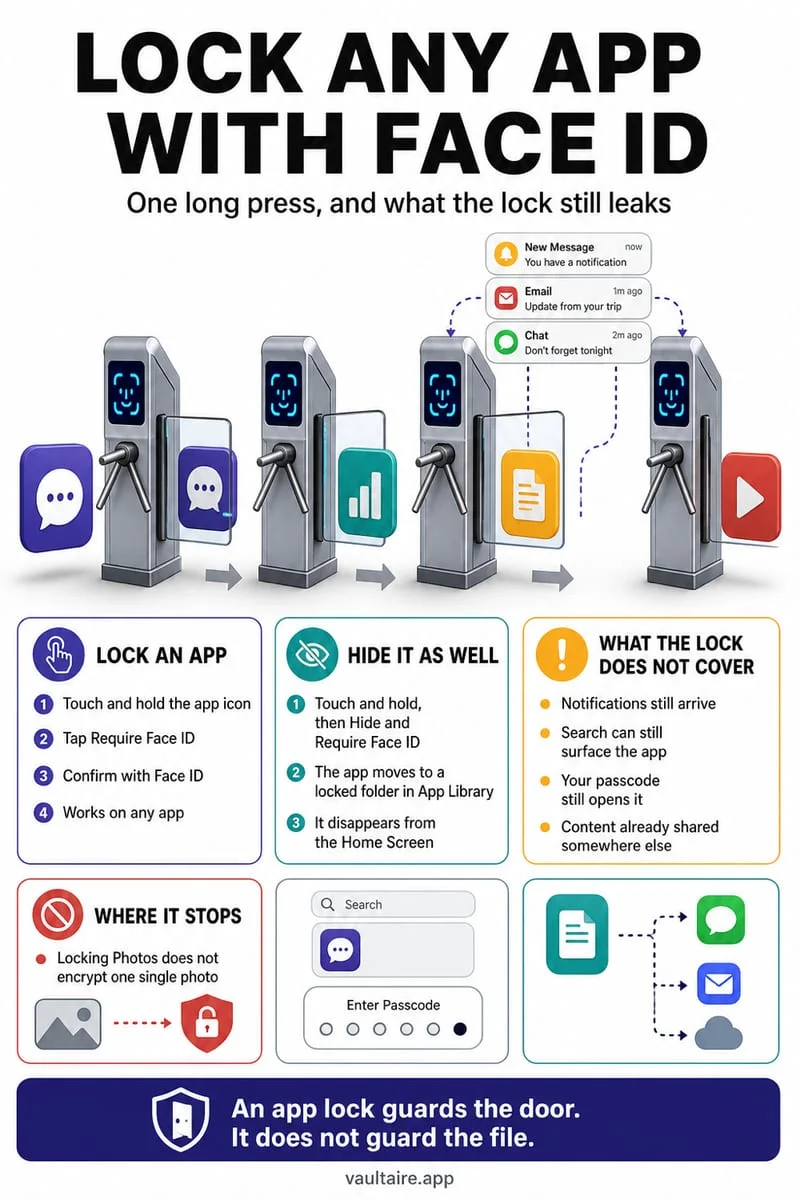
Historically, millions of iPhone users downloaded disguised calculator apps because older versions of iOS provided no native way to lock or hide apps on the Home Screen. However, modern iOS now lets you hide any third-party App Store app inside the locked Hidden folder at the bottom of the App Library using 'Hide and Require Face ID'—making a fake calculator icon largely redundant for visual camouflage.
In fact, having a second third-party calculator app sitting next to Apple's pre-installed Calculator app is now one of the most well-known internet tropes, often drawing more suspicion from a partner or friend than hiding an app natively through iOS.
3 hidden security risks inside popular calculator vault apps
First, security through obscurity is not encryption. Forensic analyses of popular disguised calculator apps have repeatedly revealed that many simply move your `.heic`, `.jpg`, and `.mov` files into their unencrypted app sandbox folder (`Documents/` or `Library/Caches/`). If someone extracts an unencrypted computer backup or inspects the app container, every photo and thumbnail is sitting in plaintext.
Second, because entering a secret on a basic calculator keypad limits you to digits `0–9`, your unlock secret is constrained to low-entropy numeric codes rather than a full passphrase, 3×3 pattern, or multi-turn combination dial.
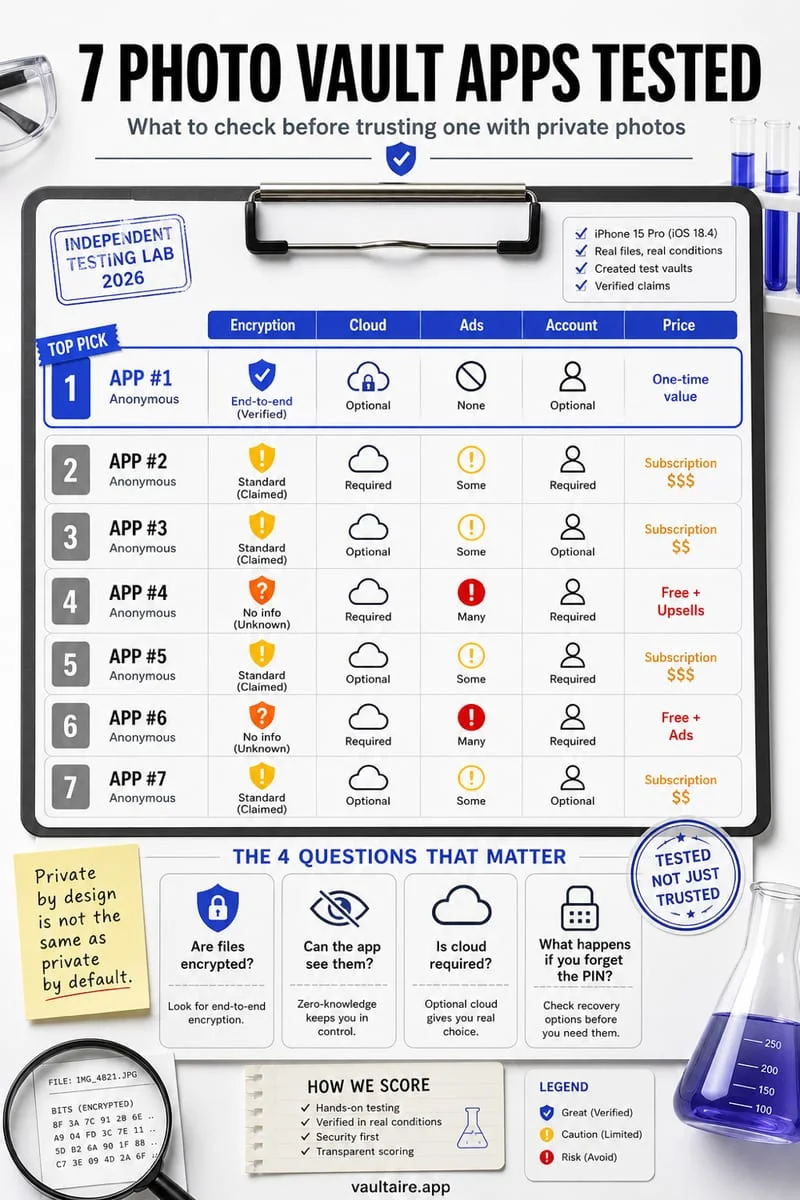
Third, the 'secret calculator' search category on the App Store is flooded with white-label clones that monetize through intrusive full-screen ad SDKs, aggressive weekly subscription traps, and unverified cloud backup servers—and when those clone apps get removed from the App Store, iOS's 'Offload Unused Apps' feature can leave your photos permanently stranded inside an unlaunchable container.
| Security Dimension | Typical Calculator Vault App | Octoshield Photo & File Vault |
|---|---|---|
| On-Disk File Protection | Often unencrypted files hidden behind a calculator UI | AES-256-GCM in 512 KB chunks + HKDF-SHA256 per-item keys |
| Thumbnail & Index Security | Frequently caches plaintext JPEG previews | Separate AES-256-GCM keys for each thumbnail & index |
| Unlock Secret Options | Digits only on calculator keypad | PIN, Passphrase, 3×3 Pattern, or Safe Combination Dial |
| Hardware Key Binding | Rarely bound to hardware Keychain | PBKDF2-SHA256 secret + device-bound iOS Keychain key |
| Accounts, Ads & Cloud Tracking | Often ad-supported with paid cloud upsells | Zero accounts, zero cloud servers, 100% local |
Why real AES-256-GCM encryption beats a fake calculator icon
Instead of hoping nobody questions why you have two calculator apps on your iPhone, a true cryptographic vault protects your media even when an adversary knows the app is installed. Built by TengrX, Octoshield encrypts every imported file in 512 KB chunks using authenticated AES-256-GCM, deriving separate keys via HKDF-SHA256 from a random 256-bit master key for every file, thumbnail preview, and encrypted index entry.
Octoshield stretches your secret—whether you choose a PIN, a full passphrase, a 3×3 pattern, or a safe-style combination dial—using PBKDF2-SHA256 and combines it with a random device-bound key stored in the iPhone's hardware-backed Keychain (plus a separate biometric-protected Keychain slot if you enable optional Face ID / Touch ID). And if you still want the app icon invisible on your Home Screen, you can long-press Octoshield and select iOS's built-in 'Hide and Require Face ID'.
- Open your old calculator vault app, select all stored photos and videos, and export/unhide them back to your iPhone camera roll.
- Install Octoshield and configure your preferred lock (PIN, Passphrase, 3×3 Pattern, or Safe-style Combination Dial).
- Import your photos and videos into Octoshield (or swipe up on items inside the Cleaner tab to encrypt them into the vault and queue original removal).
- Verify your files open cleanly in Octoshield, confirm deletion of the temporary copies in Apple Photos, and empty Collections → Utilities → Recently Deleted.
- Only after verifying every file inside Octoshield, uninstall the old calculator app.
How to tell if your current calculator vault is putting your photos at risk
If you already have photos stored inside a calculator app and aren't sure whether to migrate immediately, check three warning signs inside iOS Settings. First, open Settings → Privacy & Security → App Privacy Report and inspect whether your calculator app is contacting third-party ad domains or remote analytics servers every time you view your private photos.
Second, open Settings → [Your Name] → iCloud → Manage Account Storage → Backups → [Your iPhone] and check whether the calculator app is uploading gigabytes of unencrypted sandbox data into your standard iCloud Backup. Unlike disguised lockers that dump raw files into backed-up directories, Octoshield explicitly excludes its encrypted vault from iCloud and computer backups so your media stays strictly on your physical iPhone.
Frequently asked questions
01Are calculator vault apps still necessary now that iOS can hide apps?+
No. Since modern iOS lets you lock or hide third-party apps behind Face ID in the App Library's Hidden folder, you don't need a fake calculator icon to hide an app from your Home Screen—and you get far stronger security from a vault that uses real AES-256-GCM encryption.
02What happens if a calculator vault app is removed from the App Store?+
If an app is pulled from the App Store and you upgrade to a new iPhone or have 'Offload Unused Apps' enabled in Settings → App Store, iOS cannot re-download the app binary, trapping your photos inside the local container.
03Does Octoshield require an account or upload photos like some calculator apps?+
No. Octoshield requires no account or email, has no cloud servers, and keeps all AES-256-GCM encrypted vault data strictly local on your iPhone.
04Can someone tell I have a calculator vault by checking my iPhone Storage list?+
Yes. Anyone who opens Settings → General → iPhone Storage will immediately see a 'Calculator' app using several gigabytes of storage—an obvious giveaway that it is storing videos and photos rather than doing arithmetic.
05What happens if I type the wrong code into a calculator vault vs. Octoshield?+
A calculator app simply calculates a math result when you type the wrong digits, whereas Octoshield enforces real cryptographic key derivation (PBKDF2-SHA256 + hardware Keychain key) where the decryption key mathematically cannot be constructed without your exact secret.
Official sources & further reading
Lock your private photos behind real AES-256-GCM encryption.
Stop relying on a Hidden album that shares your iPhone lock-screen passcode. Import private photos and videos into Octoshield’s device-bound local vault with your own PIN, passphrase, 3×3 pattern, or safe combination dial.
- AES-256-GCM authenticated encryption in 512 KB chunks
- Encrypted thumbnails & filename catalog index at rest
- 4 lock styles: PIN, Passphrase, 3×3 Pattern, or Safe Dial + Face ID
- 100% on-device storage — zero cloud servers, zero ad SDKs
 AES-256-GCM + Cleaner
LOCAL IPHONE SANDBOX · KEYCHAIN BOUND
iOS menus can vary slightly by iOS version. Octoshield instructions describe the current local app implementation engineered by TengrX. Check the App Store listing for the version available to download.