If your Hidden album or hidden photos disappeared on iPhone, first open Settings → Apps → Photos and turn on Show Hidden Album, then look under Photos → Collections → Utilities → Hidden. If the album is visible but empty, check Recently Deleted, verify your Personal vs. Shared Library filter, confirm which Apple Account is signed into iCloud Photos, and check whether you imported the photos into a separate vault app.
Check 1: Is the Hidden album row simply toggled off?
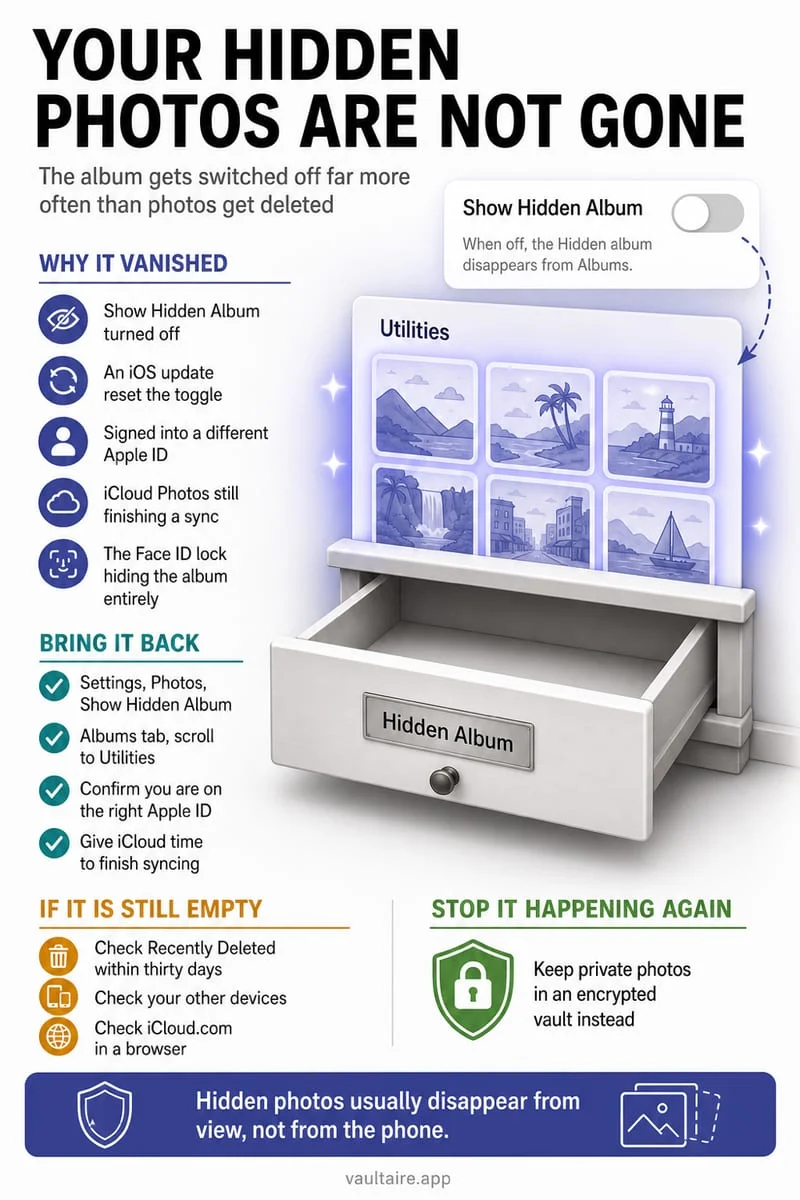
Nine times out of ten, when people search 'my hidden photos disappeared on iPhone', not a single file has been deleted—the Hidden album row itself has just been hidden from the Photos interface. Apple provides a toggle specifically designed to remove the Hidden label from the Utilities list so casual snoopers do not even see that a Hidden album exists.
After major iOS updates or settings resets, or after toggling privacy switches earlier and forgetting about them, the Hidden row disappears from Photos → Collections → Utilities. Turning 'Show Hidden Album' back on immediately restores the album row and every photo inside it without downloading or recovering anything.
Also note that the redesigned Photos app in recent iOS versions moved Utilities inside the Collections tab (or at the bottom of the unified scroll view depending on your customization). If you customized and reordered your Photos collections, tap 'Customize & Reorder' at the bottom of Photos to make sure Utilities is still checked.
- Open the Settings app on your iPhone and scroll to the bottom to tap Apps → Photos (or Settings → Photos on older iOS releases).
- Locate the Show Hidden Album toggle and switch it to ON (green).
- Open the Photos app, scroll to the Utilities section under Collections, tap Hidden, and authenticate with Face ID or your passcode.
- If Utilities itself is missing, scroll to the very bottom of Photos, tap Customize & Reorder, and ensure Utilities is enabled.
Check 2: Recently Deleted, Shared Library filters, and iCloud sync state
If the Hidden album opens but specific photos are missing from it, resist the urge to toggle iCloud Photos off and on repeatedly—doing so can interrupt active sync queues and make troubleshooting harder. Instead, work through Apple’s three library locations methodically.
First, open Utilities → Recently Deleted. Because iCloud Photos synchronizes deletions across every device signed into the same Apple Account, deleting a hidden photo on an iPad or Mac moves it to Recently Deleted on your iPhone as well. You have 30 days to select it and tap Recover.
Second, check the Library View filter in the top-right corner of the Photos app if you use iCloud Shared Photo Library. If your view is set to 'Shared Library Only' or 'Personal Library Only', items stored in the other library split may be filtered out. Switch the filter to 'Both Libraries'. Third, verify under Settings → [Your Name] → iCloud → Photos that iCloud sync hasn’t paused due to Low Power Mode, Low Data Mode, or a full iCloud storage quota.
| What You See | Most Likely Cause | Where to Fix It |
|---|---|---|
| 'Hidden' row is missing under Utilities | Show Hidden Album toggle is turned off | Settings → Apps → Photos → Show Hidden Album ON |
| Entire Utilities section is missing | Utilities was unchecked in Photos layout customization | Photos → bottom of screen → Customize & Reorder → check Utilities |
| Hidden album is empty or missing specific photos | Deleted on another synced iCloud device or moved back via Unhide | Check Utilities → Recently Deleted and main All Photos chronological grid |
| Thumbnail is blurry with an exclamation mark | Optimize Storage is on and iCloud cannot download original | Connect to Wi-Fi and check free iCloud/device space |
| Photos vanished from Photos after using a vault app | Imported into a separate vault and original removed from Photos | Open your vault app (e.g. Octoshield) to view the encrypted copy |
Check 3: Did you move the photos into a separate encrypted vault?
Apple’s Hidden album and third-party photo vaults do not share storage. If you imported private photos into Octoshield (or used Cleaner’s upward swipe to vault them) and confirmed the iOS prompt to remove the originals from Apple Photos, those pictures are no longer supposed to appear in Apple’s Hidden album.
Open Octoshield, unlock your vault using your PIN, passphrase, pattern, or combination dial, and check the Photos and Videos tabs. Because Octoshield stores AES-256-GCM encrypted copies in its own isolated local sandbox, your vaulted media stays intact even when every copy in Apple Photos and Recently Deleted has been erased.
If you ever want a vaulted photo back in Apple’s main Photos library or Hidden album, open the item inside Octoshield and use the export/share action to save a decrypted copy back to Photos.
Check 4: Honest recovery boundaries and avoiding scam 'recovery' software
When photos are genuinely missing, understanding what can and cannot be recovered saves you from dangerous desktop 'iPhone recovery' tools that demand your Apple Account credentials or full unencrypted device backups.
For photos that lived in Apple Photos: if they are no longer in Hidden, All Photos, Recently Deleted, iCloud.com, or a previous computer/iCloud backup made before the deletion, iOS hardware encryption erases the file’s encryption key on permanent deletion—meaning third-party scanning software cannot reconstruct them from flash memory.
For photos that lived inside Octoshield: because Octoshield is engineered by TengrX with strict device-bound encryption (excluded from iCloud and computer backups, with no remote server), files deleted from inside the vault—or lost because the app was uninstalled or the device was replaced without exporting first—cannot be recovered by Apple or by TengrX. Always export essential files before switching iPhones.
Frequently asked questions
01Does turning off 'Show Hidden Album' in Settings delete my hidden photos?+
No. Turning off Show Hidden Album only hides the album label from the Photos app interface. Your photos remain untouched and reappear immediately when you toggle Show Hidden Album back on.
02Why did my hidden photos disappear after updating to the latest iOS?+
Major iOS updates sometimes reset view filters, reorder the Collections tab, or temporarily pause iCloud Photos indexing while the device re-indexes locally on power and Wi-Fi.
03Can unhiding a photo make it look like it disappeared?+
Yes. When you tap Unhide on a photoTaken three years ago, it returns to its original capture date in your main library rather than jumping to the bottom of Recents. Search by the date or location it was taken.
04Will a photo vault app recover photos that disappeared from Apple’s Hidden album?+
No. A photo vault protects files you explicitly import into it; it cannot retrieve missing files from Apple’s system library.
05Do hidden photos transfer when I set up a new iPhone?+
Photos in Apple’s Hidden album transfer if you use iCloud Photos or a full device-to-device migration. However, photos in a device-bound local vault like Octoshield are excluded from backups and must be exported before changing phones.
Official sources & further reading
Lock your private photos behind real AES-256-GCM encryption.
Stop relying on a Hidden album that shares your iPhone lock-screen passcode. Import private photos and videos into Octoshield’s device-bound local vault with your own PIN, passphrase, 3×3 pattern, or safe combination dial.
- AES-256-GCM authenticated encryption in 512 KB chunks
- Encrypted thumbnails & filename catalog index at rest
- 4 lock styles: PIN, Passphrase, 3×3 Pattern, or Safe Dial + Face ID
- 100% on-device storage — zero cloud servers, zero ad SDKs
 AES-256-GCM + Cleaner
LOCAL IPHONE SANDBOX · KEYCHAIN BOUND
iOS menus can vary slightly by iOS version. Octoshield instructions describe the current local app implementation engineered by TengrX. Check the App Store listing for the version available to download.