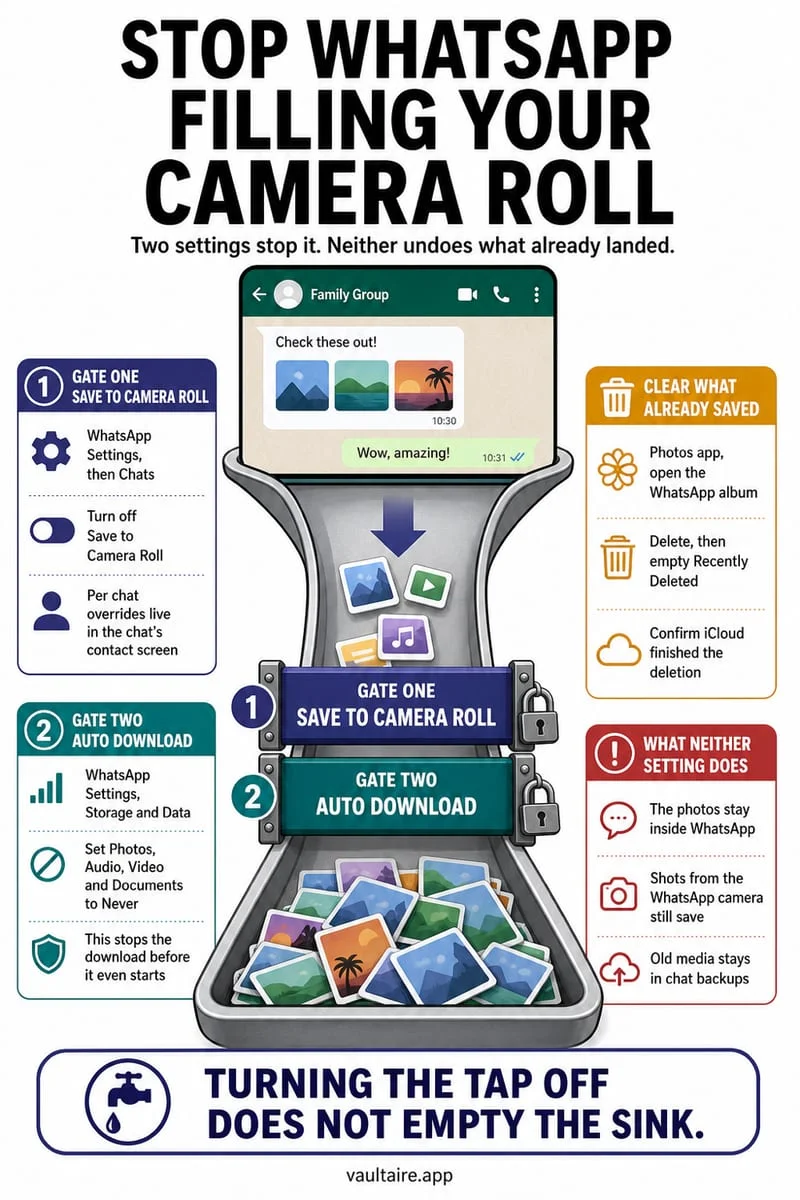
First establish whether the returning item is the same library photo or a newly saved copy. Check iCloud Photos activity, computer photo syncing, and apps that save attachments. Deleting one copy does not stop a different app or import from creating another.
Investigate one returning picture
Choose one recognizable image and note its date, filename if shown, and where it appears. A picture visible in Recently Deleted has not returned to the main library; it is in the normal recovery area. A new copy saved from a chat is a different case.
Avoid toggling iCloud Photos repeatedly while investigating. That changes the sync setup and makes it harder to understand which library you are looking at. Do not erase the phone as a first troubleshooting step.
- Open the image information and compare the returning copy with the one you deleted.
- Check whether Photos reports syncing or paused activity.
- Check whether the picture is being saved again from Messages, another app, or a computer import.
A gray trash button points to a different source
Apple notes that computer-synced photos may need to be removed by changing the computer’s photo-sync selection. Reimporting the same folder can bring those pictures back. Change the source selection deliberately, after keeping any originals you still need.
For a chat attachment that keeps being saved, change that app’s save behavior before cleaning the library again. Deleting the visible result without addressing the source is a temporary fix.
Clean after stopping the repeat import
Octoshield can help review the clutter that remains once the source is understood. Its deletion queue lets you inspect your decisions before the iOS confirmation. It does not repair iCloud sync or stop another app from saving a new copy.
If the goal is privacy, import a verified copy into the vault and separately review originals, Recently Deleted, and other services. A vault import cannot recall a photo that already exists in someone else’s account.
Frequently asked questions
01Does a returning picture mean someone restored it remotely?+
Not by itself. First rule out new copies, computer syncing, and the normal Recently Deleted view. A returning thumbnail alone does not establish account compromise.
Official sources & further reading
Clean your iPhone camera roll one swipe card at a time.
Review cluttered photo batches without grid fatigue: swipe left to queue unwanted shots for deletion, swipe right to keep memories in Apple Photos, or swipe up to encrypt private photos straight into your vault.
- Tactile 3-way card review: Left delete, Right keep, Up vault
- Safe review queue + instant Undo before iOS removes anything
- Built-in AES-256-GCM encrypted photo, video & file vault
- 100% local processing on your iPhone — free to download
 AES-256-GCM + Cleaner
LOCAL IPHONE SANDBOX · KEYCHAIN BOUND
iOS menus can vary slightly by iOS version. Octoshield instructions describe the current local app implementation engineered by TengrX. Check the App Store listing for the version available to download.