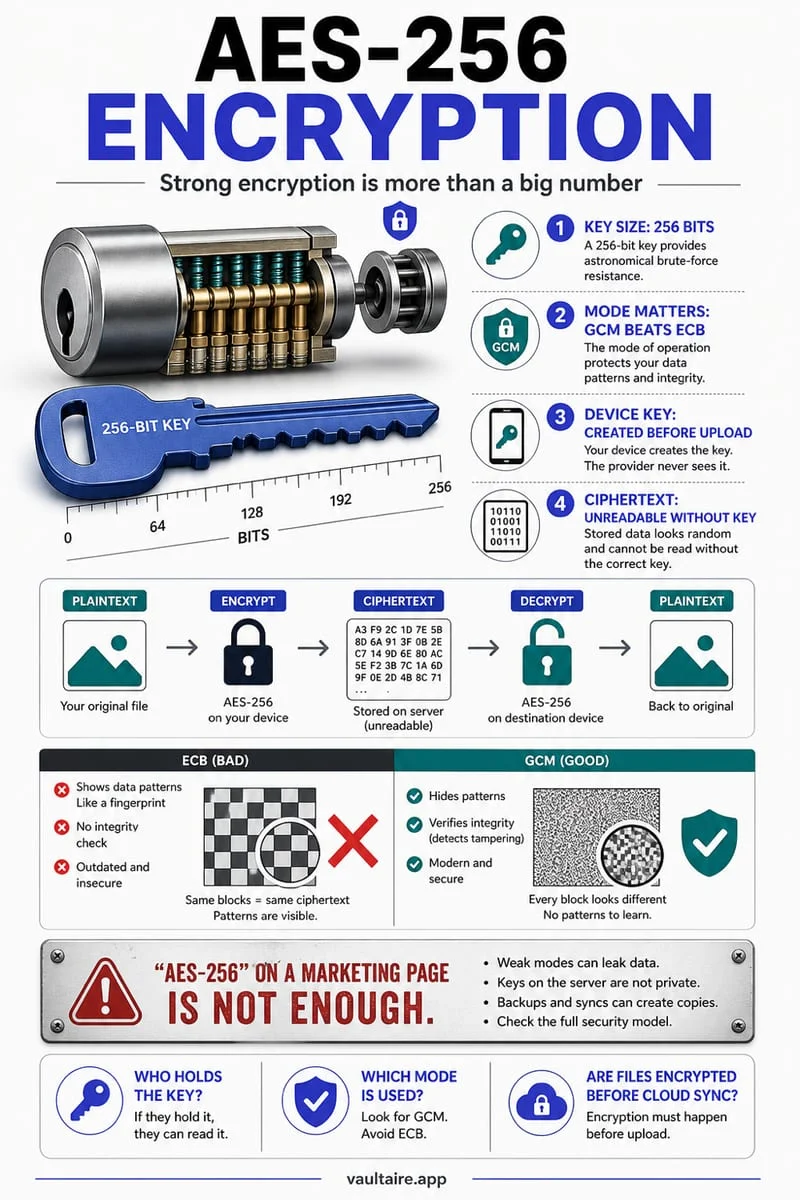
AES-256-GCM (Advanced Encryption Standard with 256-bit keys in Galois/Counter Mode) is the industry-standard authenticated encryption cipher that both scrambles data with a 256-bit key and verifies via an authentication tag that not a single byte was tampered with. In Octoshield, every file is encrypted in chunks with unique per-item keys alongside encrypted thumbnails and an encrypted index.
UI access control vs. real cryptographic encryption
If you inspect how dozens of popular 'calculator vaults' and 'secret photo lock' apps on the App Store work under the hood, a startling pattern emerges: many of them do not encrypt your files at all. Instead, they display a keypad UI when you tap the icon and simply copy your `.heic`, `.jpg`, `.mov`, and `.pdf` files into a standard subfolder inside the app's sandbox directory, sometimes merely renaming the file extension from `.jpg` to `.dat`.
Relying on a UI lock screen without file-level encryption fails the moment an attacker, forensic tool, or backup extractor looks past the app's front door. If an app leaves plaintext files or plaintext preview thumbnails on disk, anyone inspecting an extracted backup, a shared cloud container, or a compromised filesystem can view every photo without ever knowing your PIN.
Real cryptographic encryption transforms the underlying bytes of the file itself so that without the mathematical decryption key, the stored data is indistinguishable from random noise.
Why AES-256-GCM in 512 KB chunks is the gold standard for mobile vaults
AES-256-GCM (Advanced Encryption Standard with a 256-bit key operating in Galois/Counter Mode, defined by NIST SP 800-38D) is an **Authenticated Encryption with Associated Data (AEAD)** cipher. Unlike legacy encryption modes that only scramble bytes, AES-256-GCM provides two simultaneous cryptographic guarantees: **confidentiality** (turning plaintext into ciphertext using a 256-bit key and unique nonce) and **integrity/authenticity** (generating a cryptographic authentication tag that mathematically verifies not a single bit of ciphertext was altered, truncated, or corrupted).
On an iPhone, encrypting a 2 MB photo in one shot is trivial, but a 10-minute 4K video or large PDF archive can easily exceed 2 GB. If a vault app tried to load a 2 GB ciphertext file into RAM all at once before verifying its authentication tag, iOS would terminate the app for exceeding mobile memory limits. That is why Octoshield (built by TengrX) implements **AES-256-GCM in 512 KB authenticated chunks**: large files are split into independent 512 KB blocks, each with its own authentication tag, allowing your iPhone to verify and stream encrypted video smoothly with minimal memory overhead.
| Cryptographic Layer | Basic 'PIN Lock' Apps | Legacy Unauthenticated Cipher (e.g., AES-CBC) | Octoshield Architecture (AES-256-GCM) |
|---|---|---|---|
| File content at rest | Plaintext JPEG/HEIC/MOV in app folder | Encrypted, but no built-in tamper detection | AES-256-GCM authenticated encryption in 512 KB chunks |
| Thumbnails & filenames | Often left as plaintext files & SQLite rows | Frequently left unencrypted for grid speed | Encrypted thumbnails & encrypted catalog index |
| Key hierarchy | None (boolean check against stored PIN) | Often a single static key derived from PIN | Random 256-bit master key + HKDF-SHA256 per-item keys |
| Hardware Keychain binding | Rarely bound to hardware | Varies; often extractable from backups | PBKDF2-SHA256 user secret + device-bound iOS Keychain key |
How Octoshield combines PBKDF2-SHA256, HKDF-SHA256, and the iOS Keychain
Even the strongest cipher like AES-256-GCM is only as secure as how its keys are generated, derived, and stored. If an app derived its encryption key solely from a 4-digit PIN without hardware binding, an attacker who obtained the ciphertext could test all 10,000 PIN combinations on a desktop GPU in less than a millisecond.
Octoshield defeats offline brute-force attacks through a multi-layered key hierarchy. First, when you initialize your vault, Octoshield generates a cryptographically random 256-bit master key. From that master key, Octoshield uses **HKDF-SHA256** (HMAC-based Key Derivation Function) to derive separate, isolated subkeys for each individual file, its preview thumbnail, and the encrypted catalog index.
Second, to lock that master key at rest, Octoshield takes your chosen secret—a numeric PIN, alphanumeric passphrase, 3×3 pattern, or safe-style combination dial—stretches it using **PBKDF2-SHA256**, and combines it with a random device-bound key stored inside the iPhone's hardware-backed Keychain. If you optionally enable Face ID or Touch ID, Octoshield stores an unlock token in a separate biometric-protected Keychain slot.
- Your secret (PIN, passphrase, 3×3 pattern, or combination dial) is stretched via PBKDF2-SHA256 and combined with a random device-bound iOS Keychain key.
- Together, those two halves unwrap the random 256-bit vault master key in memory only while the vault is unlocked.
- HKDF-SHA256 derives unique per-item keys from the master key for each file, its thumbnail, and the encrypted catalog index.
- Each file is encrypted and verified in 512 KB chunks using AES-256-GCM, and all vault files are flagged to be excluded from iCloud and computer backups.
The honest tradeoff of zero-knowledge local encryption: No backdoors
True on-device cryptography comes with a real-world responsibility that every user should understand upfront: **there is no backdoor, no cloud recovery server, and no 'Forgot Password' email link.** Because Octoshield has no user accounts, never transmits your keys or files to a server, and binds your vault to your physical iPhone's Keychain while excluding files from backups, neither TengrX nor Apple can decrypt your vault if you forget your secret or lose your phone.
Always choose a secret you will reliably remember, and always export essential documents or irreplaceable photos from your vault before trading in, selling, or resetting your iPhone.
Frequently asked questions
01What does the 'GCM' in AES-256-GCM stand for?+
GCM stands for Galois/Counter Mode. Unlike older encryption modes (such as AES-ECB or unauthenticated AES-CBC) that only scramble data, GCM is an Authenticated Encryption with Associated Data (AEAD) mode that computes a cryptographic authentication tag on every chunk to guarantee the ciphertext has not been altered or corrupted.
02Why doesn't Octoshield offer a 'Forgot Password' reset link?+
A password reset link only works when a company runs a cloud server that holds a copy of your decryption keys or can override an account check. Because Octoshield operates 100% locally on your iPhone with real AES-256-GCM encryption and zero servers, only your secret (combined with your device's Keychain key) can mathematically unwrap your master key.
03Why must I export my files before switching to a new iPhone?+
Octoshield combines your PBKDF2-stretched secret with a random device-bound iOS Keychain key that never leaves your current iPhone hardware, and marks vault files as excluded from iCloud and computer backups. Exporting your files before upgrading ensures you can transfer and re-encrypt them on your new iPhone.
04Does enabling Face ID in Octoshield weaken the AES-256-GCM encryption?+
Enabling Face ID or Touch ID does not change the AES-256-GCM file encryption or the 256-bit master key; it adds a separate biometric-protected iOS Keychain slot that can unwrap the master key when iOS verifies your face or fingerprint. If you want protection against forced biometric scans, you can keep Face ID turned off inside Octoshield.
05Are filenames and thumbnails also encrypted in Octoshield?+
Yes. Encrypting only the main photo or PDF is incomplete if thumbnails or filenames sit in plaintext. Octoshield uses HKDF-SHA256 to derive separate keys from the master key to encrypt every file, its preview thumbnail, and the vault catalog index itself.
Official sources & further reading
Keep sensitive PDFs, IDs & documents in an encrypted iPhone vault.
The iOS Files app leaves filenames and folders exposed whenever your phone is unlocked. Import tax returns, passport scans, and private PDFs into Octoshield for hardware-bound AES-256-GCM protection.
- Encrypts PDFs, scans, documents, photos, and videos on-device
- Hides document filenames inside an encrypted catalog index
- Automatic cleanup of temporary preview scratch files on lock
- PBKDF2-SHA256 + iPhone Keychain hardware key binding
 AES-256-GCM + Cleaner
LOCAL IPHONE SANDBOX · KEYCHAIN BOUND
iOS menus can vary slightly by iOS version. Octoshield instructions describe the current local app implementation engineered by TengrX. Check the App Store listing for the version available to download.